Abandoned Cart Email Automation: How to Build Your Flow
Abandoned cart email automation is a flow that watches for shoppers who add items to a cart and leave, waits a short delay, then sends a sequence of reminder emails showing their cart and a link back to it. The flow stops the moment they buy. To set it up, connect your store to your email platform, trigger the flow on a cart or checkout event, send three emails over about three days, and test it with a real cart before you turn it on.
About 70% of online carts are abandoned, according to the Baymard Institute's meta-analysis. Some shoppers were only browsing. Many others left over shipping costs, a slow delivery estimate, a forced account, or a long checkout. Most stores either run one default reminder or a flow nobody tested. Broken cart links, emails that arrive after the purchase, and discounts handed to people who would have bought anyway are all common, and they cost real revenue.
This guide walks through seven steps that work on any major platform. They cover tracking, triggers, timing, copy, offers, SMS, and testing. You also get copy-ready email templates and a worked revenue example. At Chromex Marketing, we build these flows for ecommerce brands on Klaviyo and Omnisend, so the advice comes from flows we run, not from help-center screens alone.
Why it pays and what you need before you build
An abandoned cart flow pays because a shopper who adds a product to a cart has already shown buying intent, and a timely reminder reaches them before that intent fades. Before you build, you need a connected store, a way to identify shoppers by email, and permission to market to them. This section covers the case for the flow, the prerequisites, and the legal basics.
What the flow is worth
Baymard's meta-analysis puts average cart abandonment near 70%. Around 42% of those shoppers were "just browsing" or "not ready to buy," so you will never recover them all. The rest left for reasons you can address, such as extra costs at checkout, a slow delivery estimate, a forced account, or a checkout that took too long. A good sequence answers those objections one by one instead of repeating "you forgot something" three times.
Here is an illustrative example. These inputs are assumptions for a mid-sized store, not benchmarks, so replace them with your own numbers.
| Input | Value |
|---|---|
| Carts created per month | 2,000 |
| Abandoned carts (70%) | 1,400 |
| Abandoned carts with a known email (40%) | 560 |
| Orders recovered by the flow (8%) | about 45 |
| Average order value | $70 |
| Recovered revenue per month | about $3,150 |
The share of carts with a known email is the number you control most. On one niche tech brand we work with, we added $1.2M in email-attributed revenue over 10 months, and automations contributed $1.1M. That is why we build flows before campaigns.
What you need in place first
Gather these before you open the flow builder:
- A supported store integration (Shopify, WooCommerce, BigCommerce or a custom API) connected to your email platform.
- A plan that includes automation. Some platforms tie automation features to the pricing tier, so check yours.
- An authenticated sending domain with SPF and DKIM set up, so reminders reach the inbox.
- A way to identify shoppers, such as a sign-up form early in the visit, an email field at the start of checkout, or a login.
- Your offer rules: whether you will use free shipping, a discount, or nothing, and at what cart value.
A flow can only reach shoppers whose email address you already know.
Are abandoned cart emails legal?
Yes, when you send them to people who gave you their email and you follow the rules for commercial email. Abandoned cart emails use first-party data, meaning behavior you observe on your own store after someone shares their address. That is a different thing from buying a list. Platforms handle consent differently. Mailchimp, for example, sends the first abandoned cart email to any contact who abandons a cart, but later emails in the flow go only to subscribed contacts.
In the United States, treat these as marketing emails. The FTC's CAN-SPAM compliance guide requires accurate sender and subject information, a valid physical postal address, and a working unsubscribe that you honor within 10 business days. If you ship to the EU or UK, GDPR rules on consent apply as well, and you should ask a lawyer about your setup.
Step 1. Connect your store and confirm tracking
Connect your store through your email platform's native integration, then confirm that cart, checkout and order events appear on a test profile before you build anything. If the events don't arrive, the flow sends nothing, and it fails silently.
Connect the integration
Use the native integration for Shopify, WooCommerce or BigCommerce where one exists. Custom stores need an API or tracking script, which is a developer task. Each platform starts in a different place:
| Platform | Where to start | Good to know |
|---|---|---|
| Mailchimp | Automations, Build from scratch, Choose a trigger, Shopping Activity, Abandons cart | Needs a connected supported store or custom API 3.0 integration. The trigger can't be combined with another trigger. |
| Brevo | Automations, Workflows, Create an automation, Abandoned cart pre-built | Install the Brevo tracker and set up the cart_updated, cart_deleted and order_completed events. |
| Omnisend | Separate abandoned cart and abandoned checkout automations | The cart automation fires when a contact adds products to the cart and leaves before buying. |
| Klaviyo | Flow library, abandoned cart and checkout flows | Cart and checkout are separate events, so decide which one starts your flow. |
| MailerLite | Automations, Create workflow | Pick the abandoned cart trigger inside the workflow editor. |
| Shopify | Notification settings, abandoned checkout | Built in and included in your plan, but it sends one reminder. A flow in Klaviyo or Omnisend adds a sequence and reporting. |
If you want abandoned cart email automation free of extra cost, Shopify's built-in reminder is the starting point. Expect to outgrow it once you want a sequence, splits and revenue reporting.
Verify the events
Run this check once the integration is live:
- Open your store in a private browser window.
- Enter an email at checkout, or log in to a test account.
- Add a product to the cart and start checkout.
- Open that profile in your email platform and look at its activity feed.
- Confirm the cart event shows the items, images, prices and a working cart URL.
- Place a small test order and confirm the order event arrives too.
You need the order event as much as the cart event. It is how the flow knows to stop.
Capture the email early
The earlier you know the shopper's email, the more carts the flow can reach. Put the email field first in checkout, add a sign-up form that fires on the first visit, and keep guest checkout available. Forcing account creation pushes people to abandon in the first place.
Step 2. Set the trigger and entry rules
Trigger the flow on the earliest event where you reliably know the shopper's email, then add filters so only reachable, relevant shoppers enter. A well-filtered flow sends fewer emails and earns more per email.
Choose a cart or checkout trigger
Platforms differ on this. Klaviyo and Omnisend separate cart and checkout abandonment. Mailchimp and Brevo use a single cart trigger. If your platform offers both, run one flow, not two. Otherwise a shopper who abandons at checkout gets reminders from both flows.
A checkout-started trigger is the safer base when you collect email at the start of checkout. The shopper has typed an address and shown stronger intent. A cart-based trigger reaches more people but only those you already identified. Add the cart-based flow later as a separate "light" sequence if you want the extra reach, and make sure shoppers can't sit in both.
Set entry filters
Filters decide who gets in. Start with these:
- Cart value minimum. Brevo's own example only starts the flow when the cart total is above $10. Set yours at or above the point where a reminder is worth sending.
- Consent. Limit the flow to subscribed or eligible contacts, as Brevo's example does with an email subscription condition.
- Product rules. Mailchimp lets you include or exclude specific products. Exclude gift cards, free samples and anything you can't discount.
- Support status. Skip shoppers with an open support ticket. A cart reminder in the middle of a complaint reads badly.
- Re-entry. Allow the same person back into the flow no more than once every 7 days, so someone who toggles items doesn't get nine emails in a week.
The wait time before the first email is part of the trigger in some platforms, such as Mailchimp, where you set hours, days or weeks. Others handle it as the first step after the trigger. Either way, you decide it in Step 3.
Set exit conditions
Exit conditions matter more than entry rules. A shopper must leave the flow when they complete a purchase, and ideally also when they remove the item from their cart. Brevo does both by default. If your platform doesn't exit people automatically, add a conditional split before every email that asks whether the shopper has placed an order since the trigger. Send the email only on the "no" branch.
The worst abandoned cart email is the one that reaches a customer who already bought.
Step 3. Plan the email sequence and timing
Send three emails over about three days: the first around 2 hours after abandonment, the second at 24 hours, and the third at 72 hours. That answers the common question of how many emails belong in an abandoned cart flow, and it is a solid email sequence for abandoned carts before you start testing.
How many emails and when
Two sources agree on the shape and differ on the details. Brevo suggests 1 to 2 hours, then 24 hours, then 3 days. Klaviyo suggests 2 to 4 hours, then 24 to 48 hours after that, and warns that a third sales email after two ignored ones often does little. Here they are side by side with our default.
| Approach | Email 1 | Email 2 | Email 3 |
|---|---|---|---|
| Brevo's suggested series | 1 to 2 hours | 24 hours | 3 days |
| Klaviyo's guidance | 2 to 4 hours | 24 to 48 hours after email 1 | Optional, product suggestions |
| Our default | 2 hours | 24 hours | 72 hours |
The first email shouldn't go out too soon. Whatever interrupted the shopper may still be happening, and an email in that moment gets buried. Two hours is the overlap between both ranges.
What each email does
A good email strategy gives each message a different job, so the sequence doesn't read as the same nag three times.
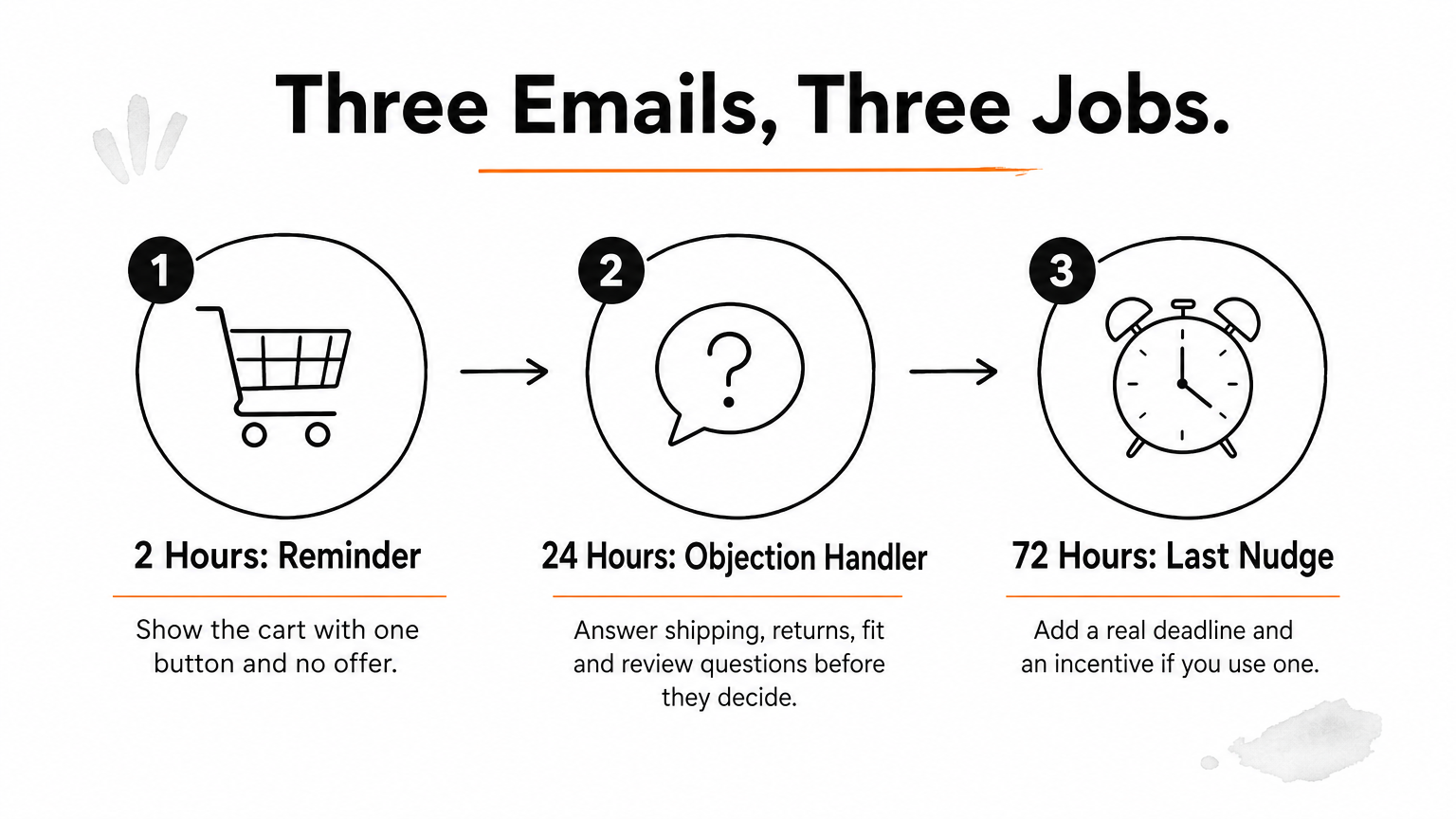
- Email 1, the reminder. Show the cart, add one button, and keep the tone friendly. No offer.
- Email 2, the objection handler. Answer the questions that stop purchases: shipping times, returns, fit, reviews. This is where you address the reason the shopper left.
- Email 3, the last nudge. Add a deadline that is real, and an incentive if you use one. Some brands use this email to show related products instead of repeating the cart.
Stop at three emails for most stores. If a shopper ignores three, they likely bought elsewhere or lost interest. A fourth email makes sense only for high-consideration products, and then it should be spaced a week out and written like a personal follow-up.
Enter the delays in your builder
Most builders count each delay from the previous step, not from the abandonment. To hit 2, 24 and 72 hours, build the flow like this:
- Trigger: cart or checkout event.
- Delay 2 hours, then check for an order, then send email 1.
- Delay 22 hours, then check for an order, then send email 2.
- Delay 48 hours, then check for an order, then send email 3.
The totals are 2, 24 and 72 hours from abandonment. Use your platform's quiet hours or smart sending setting so emails don't land at 3 a.m. in the shopper's time zone. Where the platform supports it, use the recipient's local time.
Three emails with three different jobs outperform one email sent three times.
Step 4. Write the three emails
Each email should show the exact cart, offer one button, and give one reason to come back, written in your brand's voice. Short copy wins here. The shopper already wants the product, and your job is to remove friction.
Include the essentials
Every abandoned cart email needs these parts:
- A dynamic cart block with product image, name, variant, quantity and price. Mailchimp adds a Cart content block and a button linking to the cart automatically. Brevo's default template includes a Dynamic content block that loops through the items. In Klaviyo, the product block reads the items from the trigger event.
- One clear button that links to the cart or checkout. Use action text such as "Return to cart" or "Finish checkout."
- A monitored reply-to address. Shoppers do reply with questions about sizing and shipping, and a real answer wins sales.
- Footer basics: unsubscribe link and your physical address.
Keep the layout simple. A large product image and a single high-contrast button beat a busy design. Send yourself the email on a phone before you move on, because most shoppers will open it there.
Write subject lines that earn the open
Keep subject lines under about 40 characters so they survive on mobile. Plain wording works well in the first email. Personalize with the first name or the product, and save urgency for the last email. Try these:
- Email 1: "You left something in your cart"
- Email 1 alternative: "[Product name] is still waiting"
- Email 2: "Quick answers before you decide"
- Email 3: "Last reminder: your cart is still saved"
Never fake a "Re:" or "Fwd:" prefix. It is deceptive, and CAN-SPAM prohibits misleading subject lines.
Copy-ready templates
Swap the bracketed parts for your own details and your platform's merge tags. The "cart items block" is the dynamic product block from your builder.
EMAIL 1 (send 2 hours after abandonment)
Subject: You left something in your cart
Preview: We saved it for you.

Hi [First name],

You left a few things in your cart. We saved them so you can
pick up right where you stopped.

[Cart items block: image, name, variant, price]

[Button: Return to cart]

Questions about fit, shipping or delivery? Reply to this email
and a real person will answer.

[Brand name]
EMAIL 2 (send 24 hours after abandonment)
Subject: Quick answers before you decide
Preview: Shipping, returns and what customers say.

Hi [First name],

Still deciding? Here is what shoppers ask most about
[Product name]:

- Shipping: [your delivery times and free-shipping threshold]
- Returns: [your return policy in one line]
- What customers say: "[One short, real review]" - [Name]

[Cart items block]

[Button: Finish checkout]
EMAIL 3 (send 72 hours after abandonment)
Subject: Last reminder: your cart is still saved
Preview: [Your offer, if you use one]

Hi [First name],

Your cart is still saved, but we can't promise these items will
stay in stock. [Only keep this line if it is true.]

[If you use an offer: Use code [CODE] for [free shipping / X% off]
on this order. It expires on [date and time].]

[Cart items block]

[Button: Complete my order]
Write for a shopper who already wants the product and needs one good reason to finish.
Step 5. Add offers and smart splits
Hold the incentive until email 3, and offer it only to carts worth the discount. A flow that gives everyone a code in email 1 teaches shoppers to abandon on purpose.
Match the offer to the reason they left
Different shoppers leave for different reasons, and the flow should respond to the likeliest one. Baymard found that extra costs such as shipping push around 40% of abandoners away, and 17% leave because checkout takes too long. Use this map:
| Why shoppers leave | What to put in the flow |
|---|---|
| Shipping and fees too high | Free shipping offer in email 3, or a free-shipping threshold message in email 2 |
| Delivery estimate too slow | Show delivery times in email 2 and offer expedited options |
| Doubt about trust or quality | Add a return policy line and a short real review in email 2 |
| Forced account creation | Offer guest checkout and link straight to it |
| Long checkout | Link to checkout and enable express wallets such as Apple Pay and Google Pay |
If you can only test one incentive, test free shipping against a percentage discount on your best-selling category. Free shipping often costs less than a discount on a high-margin product.
Split by cart value and customer type
Add conditional splits after the trigger so the flow changes with the shopper. Four splits cover most stores:
- Cart value. Offer the incentive only when the cart is at or above your average order value. At a $70 average order, a 10% code costs $7 per recovered order, which a $120 cart absorbs easily and a $25 cart does not.
- New versus returning customers. A first-time shopper may need trust signals. A returning customer needs a simple reminder and likely no discount.
- Loyalty members. Remind them of their points instead of giving a code.
- Product category. A shopper who left skincare needs different copy from one who left a gift set.
Keep the split count low at first. Two splits that work beat six that you can't maintain.
Protect your margin
A common mistake is training your list to wait. If the same shopper gets a code every time they abandon, they will keep abandoning. Offer a one-time code tied to a single email address, set it to expire, and exclude recent buyers from receiving it again. Once the flow is stable, hold out a small share of shoppers who get no incentive, and compare their purchase rate to see what the offer actually adds.
Give the discount to carts that need it, not to shoppers who were already coming back.
Step 6. Add SMS to the flow
Add SMS only for shoppers who opted in to text marketing, and send one short message after the first email. SMS is optional, but it can reach shoppers who ignore their inbox.
Check consent first
Texting has stricter consent rules than email in the United States. You need prior express written consent for marketing texts, and email permission doesn't carry over. Your sign-up form must say what the shopper is agreeing to, including that cart reminders are included. Platforms enforce parts of this. Mailchimp, for example, requires an approved SMS program, double opt-in, updated terms and privacy policy language for abandoned cart texts, and opt-out instructions in every message. Other platforms have their own rules, so check yours before you build.
Place one text in the flow
Send a single text at about the 24-hour mark, the same time as email 2, and only to subscribers who haven't bought. Mailchimp, as one example, allows 1 SMS per abandoned cart, sent within 48 hours of the shopper entering the flow, which is a useful limit for any platform. Keep the text under about 160 characters and use your platform's cart link merge tag.
[Brand]: You left [Product name] in your cart. Finish checking
out here: [Cart link] Reply STOP to opt out.
Add a conditional split before the text so shoppers who have already opened email 2 and clicked skip it. A shopper who clicked doesn't need a second nudge.
One well-timed text beats three, and it keeps your opt-out rate low.
Step 7. Test, launch and measure the flow
Test the flow with a real cart before you turn it on, then watch the first two weeks of results and fix whatever breaks. A flow that was never tested is the most common reason abandoned cart emails underperform.
Test with a real cart
Brevo recommends testing under real conditions, and that means activating the flow first. Run these scenarios:
- Log in or enter an email, add a product, and abandon the cart. Wait out the first delay and confirm email 1 arrives.
- Click the cart button on desktop and on a phone. The cart must reload with the right items, quantities and price.
- Remove an item from the cart in another test and confirm the flow reacts as you expect.
- Complete a purchase mid-flow and confirm no further emails arrive.
- Apply your offer code at checkout and confirm it works and expires properly.
- Check the emails in Gmail and Apple Mail, light and dark mode.
- Click unsubscribe and confirm the shopper stops receiving the flow.
Before launch, we also run trigger, link and mobile rendering checks, and a deliverability and suppression review. It is worth doing the same on your own flow.
Measure what the flow earns
Judge the flow on revenue, not on opens. Apple Mail Privacy Protection inflates open rates for many lists, so treat opens as a rough signal at best. Track these instead:
- Recovery rate: orders attributed to the flow divided by the number of shoppers who entered it.
- Revenue per recipient: flow revenue divided by emails sent.
- Click-to-order rate: orders divided by clicks, which exposes cart link or checkout problems.
- Unsubscribe and spam complaint rates: a rising number means the timing or the offer is too aggressive.
Don't compare your recovery rate to generic benchmarks from blog posts. Set a baseline from your first month, then improve against yourself. Test one variable at a time, such as the first delay, the subject line of email 1, or free shipping versus a percentage code, and give each test enough orders to mean something.
Fix common problems
| Symptom | Likely cause | Fix |
|---|---|---|
| Few people enter the flow | Events missing or too few known emails | Recheck tracking and capture email earlier |
| Emails arrive after purchase | Missing exit condition | Add an order check before each email |
| Clicks but no orders | Cart link or checkout issue | Test the link on mobile and check shipping costs at checkout |
| Many unsubscribes | Delay too short or offer in email 1 | Move email 1 later and hold the offer back |
| Wrong prices in emails | Sale pricing not synced | Verify the cart block pulls current prices |
During big sale periods such as Black Friday and Cyber Monday, check that sale prices show in the cart block, codes don't stack, and campaign sends don't hit the same shoppers as the flow at the same moment. Our BFCM Email & SMS System builds the core automations first for this reason, then layers campaigns on top.
Launch is the start: the second week of data tells you more than the first hour of setup.
Build it once, then keep improving it
Abandoned cart email automation comes down to a few decisions made well. Track the right events, trigger on the earliest known email, send three emails with three different jobs at 2, 24 and 72 hours, hold the incentive for the last one, and test with a real cart before launch. Add SMS only for shoppers who opted in, and measure revenue per recipient instead of opens.
Do the basics first, then tune one variable at a time. A flow that is correct and boring beats a clever one that sends after the purchase.
If you would rather have the flow built, tested and tuned for you, talk to Chromex Marketing about your email and SMS setup. We work with Klaviyo and Omnisend, and we start with the automations that earn the most.