Drip Email Automation: How It Works and How to Set It Up
Drip email automation is a set of pre-written emails that send on their own, in a fixed order and at set intervals, after a contact does something or reaches a date. Someone joins your list and a welcome series starts. Someone abandons a cart and three reminders follow over the next few days. You write the sequence once, and your email software sends it to every person who qualifies, with no one pressing send.
This article covers what you need to run one yourself. You will see why drip sequences earn their place, how drip differs from behavior-based automation, and a five-part setup process. You will also get a table of how many emails each common sequence needs, a comparison of the software types you can run it on, and a plan for measuring and fixing what you build.
At Chromex, we build these sequences for ecommerce brands. Email marketers often call them email flows. The advice below comes from that work: what to send, when to send it, and where most stores go wrong.
Why drip email automation pays off
Drip email automation pays off because it reaches people at the moment they are most interested, every day of the year, without any extra work from your team. A campaign reaches your list once. A drip sequence reaches each new subscriber, buyer, or abandoned cart the same day it happens.
What it does for an ecommerce store
Most stores pay to get visitors and then lose most of them. A drip sequence gives those visitors a second chance to buy. It also moves first-time buyers toward a second order, and wakes up customers who stopped purchasing.
Here is a simple, hypothetical example. Say 2,000 people join your list each month. A welcome series converts 3% of them at a $60 average order. That is 60 orders, or $3,600 a month, which comes to $43,200 a year from emails you wrote once. Your numbers will differ, but the logic holds: the sequence runs for every new subscriber without extra effort.
A drip sequence is the one email you write once and get paid for every month.
Drip sequences vs behavior-based automation
Drip emails follow a schedule, while behavior-based email automation follows what the contact does. The two overlap more than most guides admit. A drip still starts with a trigger, such as a sign-up or a purchase, and then paces its emails with delays.
| Aspect | Drip sequence | Behavior-based automation |
|---|---|---|
| Starts when | A trigger or date | Any action or inaction |
| Path | Linear, fixed order | Branches based on clicks, views, purchases |
| Personalization | Segment level | Individual level |
| Example | 3-email welcome series | Browse abandonment email |
| Setup effort | Low | Higher |
In practice, you will use both. A new subscriber enters a welcome drip. If they click a product, a behavior rule can pull them into a product-focused path. Start with plain drips, because they are easier to build and easier to test.
How to set up drip email automation
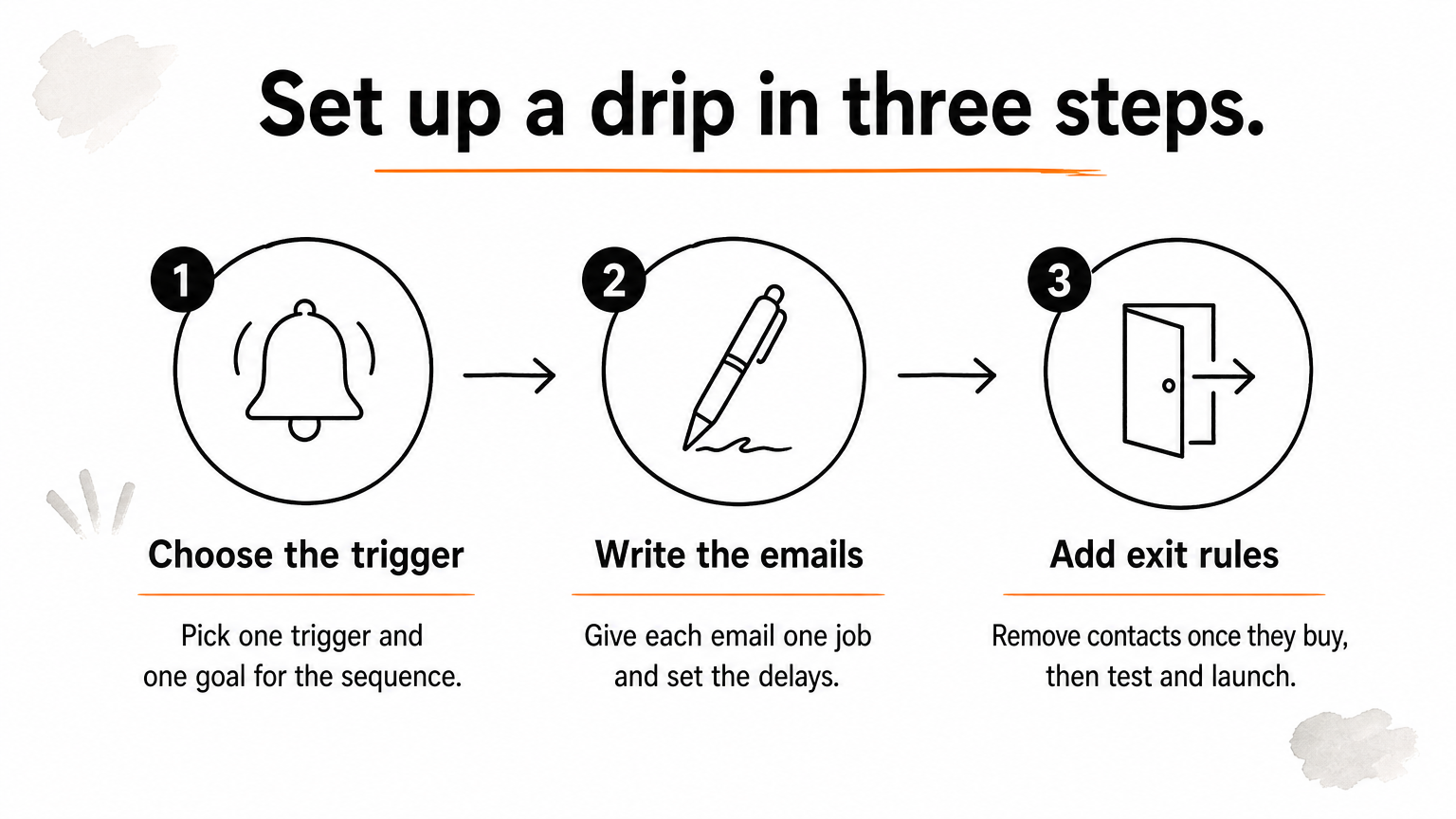
You set up drip email automation by choosing a trigger, defining who qualifies, writing each email, setting the delays, and adding exit rules. Then you test the whole sequence before you switch it on. The order matters, because each step limits the next.
Choose the trigger and the audience
Start with one trigger and one goal. Common triggers include joining your list, placing a first order, abandoning a cart, and going 90 days without a purchase. Pick the single metric the sequence should move, such as first orders or repeat orders.
Then decide who gets it. A welcome series with a first-order discount should skip people who already bought. A winback sequence should only reach customers who have been quiet for a set period. Tight audience rules matter more than clever copy, because a discount sent to the wrong person costs you margin.
Write the emails and set the delays
Give every email one job. In a welcome series, the first email delivers what you promised and sets expectations. The second tells your brand story, and the third makes the offer. If an email has two jobs, split it or cut one.
Then set the delay between emails. A common welcome rhythm is Day 0, Day 2, and Day 5. The gaps do not need to be equal, and early emails usually go out closer together while interest is high. Keep subject lines specific, keep the design on-brand, and use one clear button per email.
Add exit rules, test, and launch
An exit rule removes a contact from the sequence when the goal is met. If someone buys after your first cart reminder, they should not get the second and third. This is the step beginners skip most often, and it causes the most complaints.
Before launch, run through this checklist:
- Send each email to yourself and check it on a phone.
- Click every link and confirm discount codes work.
- Check that personalization fields fall back to a safe default when data is missing.
- Run a test profile through the trigger and watch the timing.
- Confirm no contact can sit in two sequences that send on the same day.
An exit rule is the difference between a helpful reminder and an annoying one.
How many emails to send in a drip campaign
Most drip sequences work best with 3 to 5 emails, and the right number depends on how quickly someone decides to buy. A cart reminder needs fewer emails than a welcome series, because the buyer already knows what they want.
Starting points by sequence type
Use these as starting points, then adjust with your own data.
| Sequence | Emails | Typical spacing | Job of the sequence |
|---|---|---|---|
| Welcome series | 3 to 5 | Day 0, 2, 4 to 6 | Introduce the brand, show best sellers, offer a first-order incentive |
| Abandoned cart | 3 | About 1 hour, 24 hours, 48 to 72 hours | Remind, answer objections, give a last nudge |
| Post-purchase | 3 to 4 | Order confirmation, then usage tips, a review request, a cross-sell | Build trust and drive the second order |
| Browse abandonment | 1 to 2 | Within hours of the visit | Bring back someone who viewed a product |
| Winback | 2 to 3 | After 60 to 90 days with no purchase | Re-engage lapsed customers |
These ranges are common practice, not rules from any platform. A store with a high-priced product and a long decision cycle may need a longer welcome series than a store that sells a $20 item.
How to know when to add or cut an email
Add an email only when it has a job the others do not cover. Then check your numbers. If the fourth email in a series still earns clicks and orders, keep it. If it mostly produces unsubscribes, cut it.
Also decide what happens at the end. Contacts who never open a single email in a sequence should move to a reduced sending schedule rather than stay on every list forever. That protects your sender reputation and your deliverability.
The right number of emails is the number that still earns revenue without raising unsubscribes.
Which software to use for drip email automation
Choose drip email software by what you sell and where your customer data lives. Ecommerce tools connect to your store and trigger on shopping behavior. General platforms suit simple lists, and CRMs suit lead nurture for sales teams.
Software types compared
| Type | Examples | Best for |
|---|---|---|
| Ecommerce-focused | Klaviyo, Omnisend, Drip | Online stores that need cart, browse, and purchase triggers |
| General email marketing | Mailchimp | Simple lists, newsletters, and basic welcome sequences |
| CRM-based | HubSpot, Salesforce | Lead nurture and long B2B sales cycles |
For email automation on a Shopify-style store, an ecommerce-focused platform is usually the best fit, because it reads orders, products, and browsing activity natively. We work in Klaviyo and are an official Omnisend partner, so we see how these tools behave in real accounts. The best choice is the one your team will actually configure well.
What to check before you commit
Look at the features that decide whether a drip sequence will work:
- Native integration with your store platform
- Triggers for sign-ups, orders, cart and browse activity
- Flexible delays, branching, and exit conditions
- Segmentation by purchase history and engagement
- SMS in the same tool, if you plan to use it
- Revenue reporting per sequence, not just opens and clicks
- Deliverability tools and clear unsubscribe handling
Most platforms price by contact count or send volume, so check the cost at your current list size and at double that size. A free plan can cap automation steps, so confirm it allows multi-email sequences before you build on it.
Pick the platform that reads your store data natively, because every trigger depends on it.
How to measure and improve a drip sequence
Measure each sequence by revenue per recipient and conversion rate, then use click rate and unsubscribes as supporting signals. Open rates are the weakest signal, because privacy features in some email apps inflate them.
The numbers worth tracking
Track these for each sequence, not for the account as a whole:
- Revenue per recipient: total sequence revenue divided by contacts who entered it
- Conversion rate: orders divided by contacts who entered
- Click rate: shows whether the message and offer match
- Unsubscribe and spam complaint rates: show whether the cadence is too aggressive
Compare each email inside a sequence too. If email two earns almost nothing, rewrite it or fold its job into email one.
Common mistakes to fix first
Most underperforming sequences share the same problems:
- No exit rule, so buyers keep receiving reminders
- The same discount sent to everyone, including existing customers
- Overlapping sequences that send several emails in one day
- Stale copy that mentions old products or expired offers
- Generic design that looks like every other store's inbox
Fix these before you test anything fancy. Then test one change at a time, such as a subject line, a delay, or an offer, so you know what caused the result. Review every sequence at least once a quarter.
Fix the leaks first, then test. A clever subject line cannot rescue a sequence that keeps emailing buyers.
Start with one sequence
Drip email automation is a simple idea: write a short series of emails once, set a trigger and some delays, and let software send it to everyone who qualifies. The value comes from the details. Pick one clear goal, send only as many emails as the buying decision needs, add exit rules, and judge the results by revenue per recipient.
Build the welcome series first, then abandoned cart, then post-purchase. If you want a team to build and optimize them for you, see how Chromex builds drip email automation for ecommerce brands.