Omnisend Black Friday: 5 Resources to Plan Your Campaigns
The best Omnisend Black Friday resources are the ones you can act on in a single sitting: the ecommerce strategy playbook for planning, the send-time guide for scheduling, the subject line library for opens, the SMS templates for reach, and the email templates with AI tips for speed. Founders without a plan should start with the playbook. Teams that already have an offer should jump to send times and subject lines.
The problem is volume. Omnisend publishes a lot on Black Friday, and it is hard to tell which guide solves which job when your calendar is tight. Black Friday lands on November 27 in 2026, with Cyber Monday on November 30, so you do not have time to read everything.
This list sorts the resources by the job each one does. Chromex is an official Omnisend partner and runs email and SMS programs for ecommerce brands, so the "how to use it" advice comes from running these campaigns, not just reading about them.
1. Black Friday ecommerce strategy playbook
Start with Omnisend's Black Friday ecommerce strategy playbook and its Black Friday marketing guide. Together they cover strategy and examples, which makes them the planning layer for every other resource on this list.
What it covers
The playbook frames the season around data. Omnisend's research puts average order value during Black Week at $215 in 2025, up from $164. The marketing guide adds examples and notes that merchants earn an average of $79 for every $1 spent on email and SMS with Omnisend. That figure is not specific to Black Friday, so treat it as a general benchmark.
Decide the offer and the audience before you open a template.
How to use it
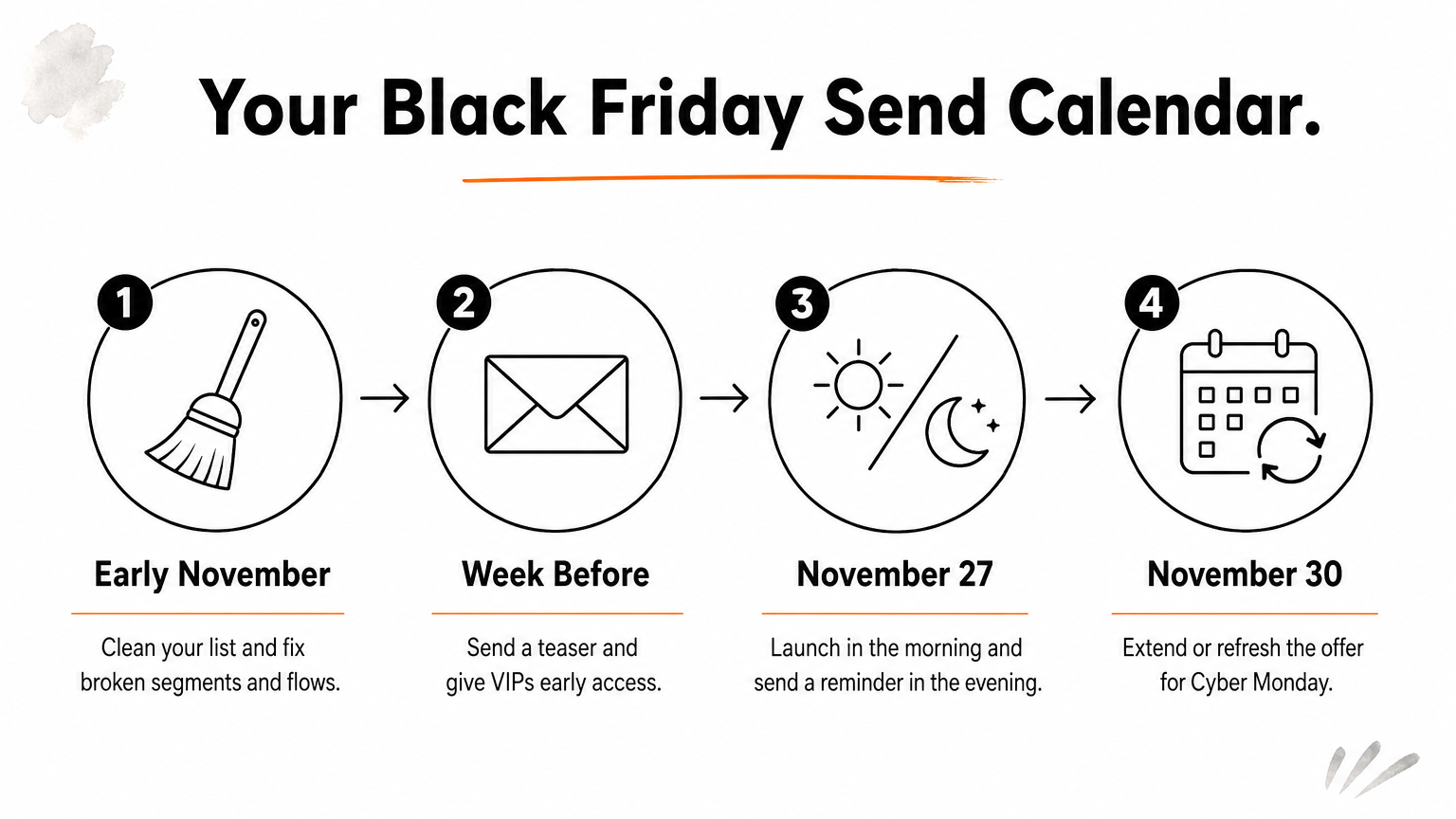
Use the playbook to lock four decisions: the offer, who gets early access, the send calendar, and the follow-up. Here is a simple calendar to work from:
- Early November: clean your list and fix broken segments and flows.
- Week before: send a teaser and give VIPs early access.
- November 27: launch in the morning and send a reminder in the evening.
- November 30: extend or refresh the offer for Cyber Monday.
A rough example shows why order value matters. A store with 400 Black Week orders makes $65,600 at a $164 average and $86,000 at $215. That is $20,400 more from the same order count. This is a hypothetical, but it shows why bundles and thresholds belong in your offer.
Who it suits
Founders and marketing leads who must choose the offer, audience and calendar. Omnisend's own advice leans toward discipline over deeper discounts, and I agree. A planned, restrained offer beats a panic discount.
2. Best time to send Black Friday emails
Omnisend's send-time guide gives a clear answer: send Black Friday emails between 6 and 9 AM or between 8 and 10 PM. It also breaks the windows down by day and email type and covers automation.
What it covers
The guide is about timing at two levels. One level is the time of day. The other is the point in the season, and Omnisend's SMS guide says the best time to start sending is the start of November.
| Timing question | Omnisend's answer |
|---|---|
| Best morning window | 6 to 9 AM |
| Best evening window | 8 to 10 PM |
| When to start the season | Start of November |
Two daily windows beat a single midnight blast.
How to use it
Put your main launch email in the morning window. Send a shorter reminder in the evening window for people who did not open it. Check how your list is spread across time zones before you schedule, because a 7 AM send is only 7 AM for part of your audience.
Treat the windows as a starting point. Run your own split test on the first campaign of the season, then shift later sends toward whichever window brings more revenue, not just more opens.
Who it suits
Anyone who schedules campaigns by hand, especially small teams that send one big blast and hope. It also helps stores whose automations fire at fixed hours and need a second look before the rush.
3. Black Friday email subject lines
Omnisend's subject line library offers 100+ Black Friday subject lines backed by data. Its main patterns are short and specific: five to seven words with urgency upfront, and the real discount amount instead of vague promises.
What it covers
The library's rules are easy to apply. Lead with the time pressure, keep the line short, and name the discount. Omnisend's own example is "60% off" rather than "huge savings."
A number in the subject line beats an adjective.
How to use it
Write three lines per campaign and test two of them. These examples follow the five-to-seven-word pattern, and they are my own wording rather than Omnisend's:
- 60% off sitewide, ends tonight
- Early access: 40% off starts now
- Your Black Friday 30% off is live
- Last call: 50% off ends at midnight
Change the urgency as the weekend goes on. "Early access" fits the teaser, "is live" fits launch, and "last call" fits the final send.
Who it suits
Stores with weak open rates, and teams without a copywriter. If your inbox is crowded by November 27, a clear discount and a deadline do most of the work.
4. Black Friday SMS marketing templates
Omnisend's Black Friday SMS guide gives you tips and 60 templates, which makes it the fastest way to add a second channel. Use SMS for the moments when timing matters most.
What it covers
The guide pairs practical tips with a large template set. It also says SMS season starts at the same early-November point as email, so your opt-in growth should begin before the sales do.
SMS is for the two moments that need a nudge: launch and last call.
How to use it
Keep texts short and send only to subscribers who opted in. Do not paste your email copy into a text. Give one offer, one deadline and one link. Here is a pattern you can copy and adapt:
[Brand]: Black Friday is live. 30% off sitewide until Sunday midnight. Shop now: [link] Reply STOP to opt out.
Send one text at launch and one before the offer ends. More than that, and you risk unsubscribes in the week your list matters most.
Who it suits
Brands with an SMS list already, and mobile-first stores whose shoppers buy from their phones. If your list is tiny, grow it first with a sign-up form before you plan a text calendar.
5. Black Friday email templates and AI tips
Omnisend's Black Friday template page and its AI email walkthrough help you finish campaigns faster. The video focuses on wrapping up campaigns and fixing segments and flows in your last prep days.
What it covers
The templates give you a layout to start from. The AI walkthrough shows how to complete campaigns, then check your segments and automated flows before launch. That second step is where many stores lose revenue, because a broken flow quietly sends the wrong message.
A fast template still needs a segment check before you send.
How to use it
Start from a template, then change it to match your brand: colors, fonts, product photos and tone. Next, check that your launch email goes to the right segment and that abandoned cart and welcome flows still make sense during the sale.
Keep the layout simple. One hero offer, one button and a few best sellers is enough.
Who it suits
Small teams that are short on time and need campaigns out the door. If you want visuals that look like your brand and nobody else's, Chromex designs every email without templates.
Where to start this week
Pick one resource for each job. Use the playbook to set the plan, the send-time guide to schedule, the subject lines to write, the SMS templates to add reach, and the templates to build quickly. Then check segments and flows before November 27.
If you would rather hand the whole thing to a team, Chromex manages email and SMS for ecommerce brands, from the audit through automations and campaigns. You can book a call with Chromex to talk through your Black Friday plan.