Omnisend Email Automation: What It Is and How It Works
Omnisend email automation is a set of workflows inside the Omnisend platform that sends emails, SMS and push messages to shoppers automatically when they take an action, such as joining your list, abandoning a cart or placing an order. You build a workflow once, or switch on a pre-built template, and it runs for every shopper from then on. Omnisend is built for online stores, so its triggers read store data and its email editor drops in your products and prices. A free plan exists, and paid plans scale with your list size.
This article explains how the system works and whether it fits your store. You will see why automation earns its place, how to set it up in the right order, what the pre-built workflows do, which features matter, what Omnisend costs at different list sizes, and where it falls short next to Klaviyo and Mailchimp.
Chromex Marketing builds email and SMS systems for DTC ecommerce brands on both Omnisend and Klaviyo, so the advice below comes from builds, not feature sheets. Where Omnisend is the right call, we say so. Where it is not, we say that too.
Why Omnisend email automation matters for online stores
Omnisend email automation matters because it answers shopper behavior at the moment it happens, with no one on your team pressing send. A campaign reaches your list once. A workflow reaches each person at the right moment, every time, for as long as it stays on.
Automations compound, campaigns do not
A promotional campaign earns its revenue in the first day or two and then stops. An automation keeps earning. A welcome series fires for every new subscriber, and an abandoned cart message fires for every shopper who leaves checkout. After a year, the same workflow has run thousands of times without extra work from you.
This is why automations should be built before campaigns. Brands that come to us with email under 10% of revenue usually have the same gap: missing or thin automated flows. Across Chromex clients, email averages about 45% of monthly revenue.
Build the workflows that run every day first, then add campaigns around them.
Why Omnisend suits ecommerce specifically
Omnisend was designed around stores, not newsletters. The editor includes a product picker that pulls items and prices from your catalog into an email. Scratch cards, gift boxes and a wheel of fortune for sign-up forms are built in. Order, cart and browsing data become triggers and filters without any custom work.
It also connects to the main commerce platforms directly: Shopify, BigCommerce, WooCommerce, Magento, OpenCart, Drupal Commerce and Volusion, among 190+ integrations. And because email, SMS and push live in one platform, a single workflow can span all three. That matters when a shopper ignores the email but answers a text.
How to set up Omnisend email automation step by step
Setting up Omnisend email automation takes six moves: connect your store, authenticate your sending domain, load your brand, capture subscribers, switch on core workflows, and test before launch. Do them in this order, because each step depends on the one before it.
How a workflow runs
Every workflow follows the same logic. A trigger starts it, such as a started checkout, a placed order, a new subscriber or a date. Filters decide who qualifies. Delay steps control timing. Message steps send an email, SMS or push. Conditional splits send shoppers down different paths, for example buyers one way and non-buyers another.
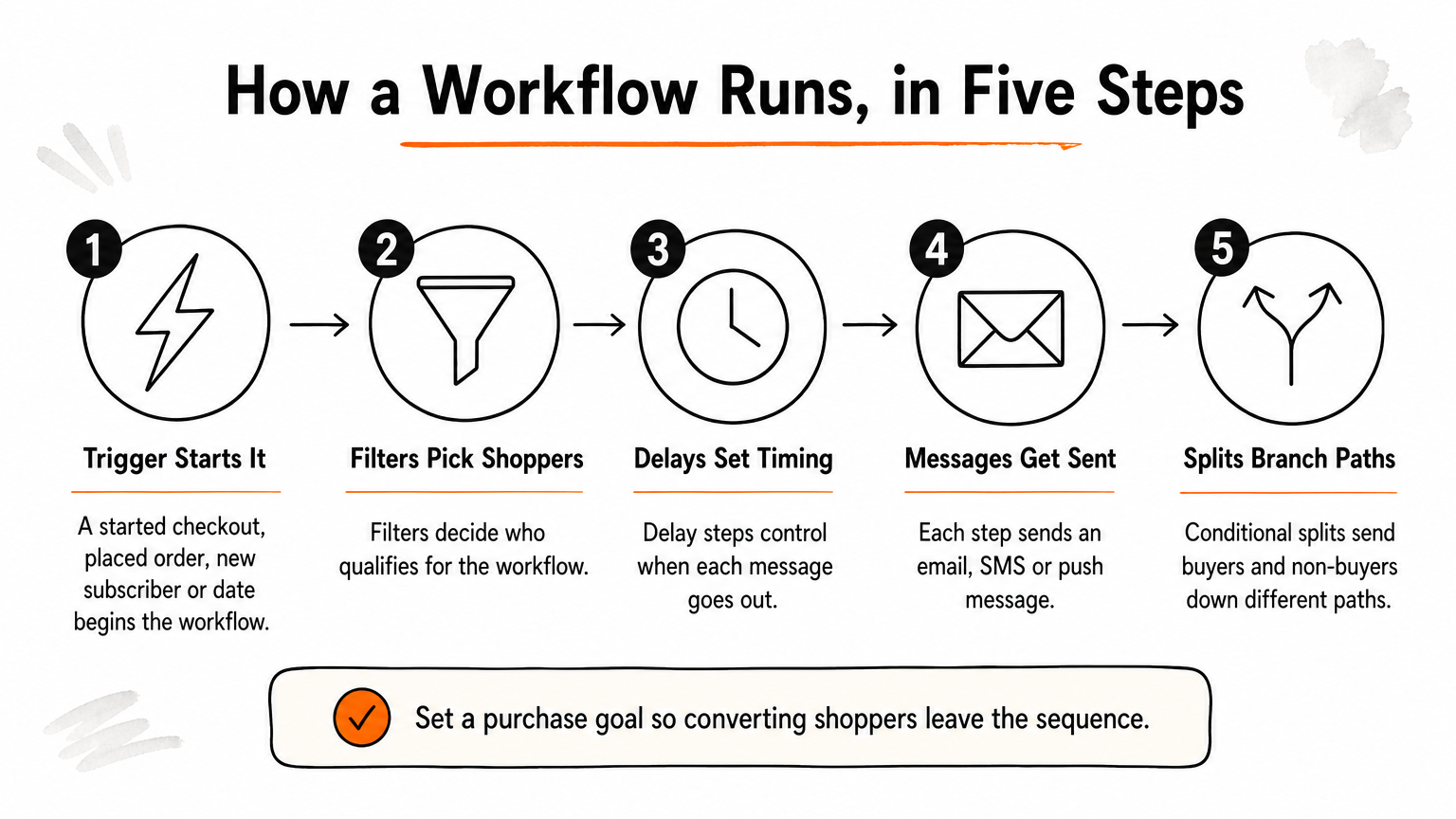
Omnisend offers many triggers, filters and conditions, and its editor is easy to use. Split automations and A/B testing are available on all plans, which some competitors reserve for higher tiers. You can also set a goal, such as a purchase, so shoppers who convert stop receiving the sequence.
The setup sequence
- Connect your store. On Shopify, add Omnisend from the app store and register from the Shopify admin. Omnisend prompts you to connect your store on first sign-in, so sync starts right away.
- Authenticate your domain. Omnisend generates SPF, DKIM and DMARC records for your domain and includes a setup wizard. Its guidance is to set DMARC to p=none with relaxed SPF and DKIM alignment. Do this before the first send, because it protects deliverability.
- Load your brand. Use "Manage your brand" to upload your logo and colors, so every template inherits them.
- Build a sign-up form. Pick a form with an incentive, and consider a multi-step version. Turn on web tracking so you can later segment by pages and products viewed.
- Switch on the core workflows. Start with the welcome series, abandoned cart and order confirmation (see the next section).
- Test every workflow. Then activate.
Authenticate your domain before your first send, because a workflow that lands in spam earns nothing.
Test before you switch it on
Omnisend gives you desktop and mobile previews, test sends, and a dynamic preview that shows your email with real contact data. It does not offer spam testing or previews by specific email client, so you need your own checklist.
Before launch, we check four things: that each trigger fires when it should, that every link goes where it should, that the email renders cleanly on mobile, and that your deliverability and suppression settings are in order. Place a real test order and walk through the full sequence yourself. Ten minutes of this catches the mistakes that otherwise run silently for months.
The pre-built workflows and what each one does
Omnisend ships with a library of automation templates, and you can filter them by type (welcome, abandoned cart), by goal (such as building loyalty) or by channel (email or SMS). Every template is built for ecommerce, so you will find fewer content-style sequences, such as blog digests, than in a general email tool.
The core workflow library
| Workflow | Trigger | Job |
|---|---|---|
| Welcome series | New subscriber | Introduce the brand, deliver the sign-up incentive |
| Abandoned cart | Cart left without checkout | Recover the sale with a reminder |
| Browse abandonment | Product viewed, no cart (needs web tracking) | Re-engage shoppers who looked but did not add |
| Order confirmation | Order placed | Reassure and invite a second purchase |
| Shipping confirmation | Order shipped | Share tracking and set expectations |
| Cross-sell | Purchase made | Recommend products related to what was bought |
| Review or feedback request | Time after delivery | Collect ratings and user-generated content |
| Customer reactivation | No purchase for a set period | Win back lapsed buyers |
| Birthday | Date field | Send a timed offer |
Treat the table as a menu, not a checklist. Most stores should not launch all of it on day one.
Which to launch first
Launch in order of revenue per effort. The welcome series and abandoned cart come first, because they catch shoppers at peak intent. Order and shipping confirmations come next, since customers expect them and they cost nothing in goodwill. Then add cross-sell, review requests and reactivation.
Omnisend's own data from the first half of 2021 shows why the transactional messages deserve care. Merchants sending order confirmations through Omnisend saw a 26% conversion rate, meaning one in four people who clicked went on to buy again. Cross-sell emails converted at 20%. Those figures are old and from Omnisend's own customers, so treat them as direction, not a benchmark for your store.
Confirmation emails are not just receipts, they are your best-timed chance at a second order.
Post-purchase flows worth building
Most stores underuse the period after checkout. Four post-purchase messages work well. A short thank-you can carry an incentive such as free shipping on the next order. An educational email teaches the customer to get more from the product, such as care tips or recipes. A feedback request asks for a rating, and an incentive can raise response. A cross-sell recommends items related to what they bought.
Give shoppers breathing room. A hard sales pitch minutes after checkout feels pushy, so wait a few days before the cross-sell. Concentrate on your higher-priced or unique products if your catalog is wide.
Features that make the workflows smarter
Omnisend's features sharpen the workflows through four levers: multiple channels, segmentation, AI tools and deliverability controls. Each one changes who receives a message and how well it performs.
Channels: email, SMS and push
Omnisend sends email, SMS, web push and mobile push, and a single workflow can mix them. An abandoned cart sequence might send an email first, then a text if the shopper has not returned. Shoppers can join your SMS list by texting a keyword, which simplifies opt-in.
Every plan includes some SMS, with an allowance at no extra cost. Beyond that, sending to the US costs about $0.015 per message. Always get proper consent before texting, and keep SMS for time-sensitive moments such as shipping delays, where a text reassures faster than an email.
Segmentation and the Customer Lifecycle Map
Segments let a workflow treat different shoppers differently. Omnisend filters on contact fields and behavior such as clicks, opens and purchases. Web-tracking filters let you segment by pages and products a person has or has not viewed. It can also suggest segments for you.
The standout feature is the Customer Lifecycle Map, which sorts subscribers by how much they spend, how often they buy and when they last purchased. That separates loyal customers from those at risk. It works best with at least 100 customers, and with around 5 to 7% of them having bought recently. Below that, it falls back on general rules instead of your own data, so a very new store will get less from it.
AI tools and deliverability controls
All AI features are available on the free plan. They include an assistant that drafts and rewrites email copy, a subject line generator, product recommendations based on browsing and purchase history, an AI Segment Builder where you describe an audience in plain language, and an AI forms assistant. Omnisend also offers an MCP server, so AI assistants like ChatGPT or Claude can connect to your account. The subject line tool is basic, and the AI overall is less deep than Klaviyo's.
On deliverability, Omnisend supports SPF, DKIM and DMARC, IP warmup, a deliverability team and a monitoring dashboard, and it prohibits purchased lists. It does not give you a deliverability score. Reports show revenue by channel, click maps and a retention report. Advanced reports such as channel trends and segment performance, and custom tracking domains, sit on the Pro plan.
Omnisend's advantage is that email, SMS and push share one set of segments and workflows.
What Omnisend email automation costs
Omnisend email automation costs nothing on the free plan and roughly $20 a month for 1,000 subscribers on the Standard plan, rising with list size. Prices change, so confirm current numbers on Omnisend's pricing page before you commit.
The free plan
The free plan includes all features, including automations and AI tools, with an unlimited contact list. The catch is volume: 500 emails a month, reaching about 250 contacts. That is two emails per contact per month, enough to test workflows but not to run a store. Other free email tools offer more generous sending, so view it as a trial that never expires.
Paid plans and a worked example
Recent published pricing for the Standard plan, where all features are included, looks like this:
| Subscribers | Monthly price | Emails per month | Cost per 1,000 emails |
|---|---|---|---|
| 250 (free plan) | $0 | 500 | $0 |
| 1,000 | $20 | 12,000 | about $1.67 |
| 5,000 | $81 | 60,000 | about $1.35 |
| 10,000 | $132 | 120,000 | about $1.10 |
Notice the pattern: every paid tier allows 12 emails per subscriber per month, so the per-email price falls as you grow. Pro plans cost more and add the advanced reporting and tracking domain mentioned above.
Take a store with 5,000 subscribers. It sends two campaigns a week, about 8 a month, which is 40,000 emails. That leaves 20,000 emails of the 60,000 allowance for workflows, which is plenty for welcome, cart and post-purchase flows at that size. The $81 plan covers it. If you add SMS, budget separately at roughly $0.015 per US text beyond the included allowance.
Chromex is an official Omnisend partner, and sign-ups through its link get 20% off the first 2 months, offered as cashback. Ask about it on your strategy call.
Plan on 12 sends per subscriber per month, and check that your flows plus campaigns fit inside it.
Omnisend vs Klaviyo and Mailchimp, and who it fits
Omnisend suits ecommerce stores that want email, SMS and push in one affordable platform with strong built-in workflows. Klaviyo suits stores that want deeper data and AI, and Mailchimp serves a wider range of senders than online stores alone.
How it compares with Klaviyo and Mailchimp
Against Klaviyo, Omnisend is the cost-effective option. It includes split automations on every plan, offers an SMS allowance in the base price, and ships a free plan with every feature. Klaviyo has more advanced AI and predictive analytics, and it gives deliverability scores, which Omnisend does not. Price both at your list size, because their pricing structures differ.
Against Mailchimp, the difference is focus. Mailchimp serves many kinds of senders, so ecommerce is one part of a larger product. Omnisend puts ecommerce first, with product pickers, store triggers and lifecycle segmentation out of the box. For an online store, that focus is the main reason to choose it.
There is no single best email automation tool. The best one is the platform your team will actually configure well. Both Omnisend and Klaviyo can drive serious revenue in the right hands, and Chromex builds on both.
Limits to check before you commit
- The platform interface is English-only, though Spanish-language support exists.
- There are no direct integrations with Google Analytics or CRM software.
- Spam testing and per-email-client previews are not available.
- You cannot build custom reports or filter out bot clicks and Apple Mail Privacy opens.
- You cannot edit form CSS, and forms embed only by pasting JavaScript.
- It has no built-in tools for selling newsletters, memberships or digital products.
None of these are deal-breakers for a typical DTC store. A few, such as missing CRM integrations, may matter if your team lives in a CRM.
Who it fits
Choose Omnisend if you run a Shopify, WooCommerce, BigCommerce or similar store, you want email and SMS together, and you value cost control. It is a strong fit for small to mid-sized brands building their first serious automation system. Look elsewhere if you need multilingual sending, deep predictive analytics or content monetization.
The short version
Omnisend email automation gives an online store ready-made workflows for the moments that earn repeat revenue: welcome, cart recovery, order confirmation, cross-sell and win-back. Switching them on is the easy part. Getting the order, timing, segmentation and deliverability right is what turns them into a revenue channel. The tool has real limits, but for most DTC stores the free plan and fair paid tiers make it a safe place to start.
If you would rather have the system built than build it yourself, book a strategy call with Chromex Marketing and we will tell you whether Omnisend or Klaviyo fits your store.