Omnisend Review (2026): Features, Pricing, Pros and Cons
Omnisend is an email, SMS, and push notification platform built specifically for online stores, and this Omnisend review gives it a strong recommendation for brands selling products on Shopify, WooCommerce, BigCommerce, and similar platforms. It combines store-aware automation with a free plan and prices that undercut Klaviyo at most list sizes. It is a poor fit for service businesses, creators, and B2B teams, because most of its value comes from the store integration.
This review covers setup steps, a feature-by-feature breakdown, tiered pricing with a worked example, pros and cons, and a comparison with the main alternatives. One disclosure up front: Chromex is an official Omnisend partner. We also build programs in Klaviyo, so the goal here is to help you find the right fit, not to push a tool. Where Omnisend falls short, we say so.
The verdict draws on how email and SMS programs run for ecommerce brands day to day, plus Omnisend's published features and user ratings. Prices below are 2026 figures. They change, so confirm them on Omnisend's pricing page before you buy.
Why Omnisend is worth a look for ecommerce stores
Omnisend earns a look because it builds everything around your store data. Flows, segments, and reports run on orders, carts, and browsing behavior instead of generic email metrics, which is what most ecommerce brands need from an email platform.
What Omnisend is and who it is built for
Omnisend launched in Lithuania in 2014 under the name Soundest and now serves more than 125,000 ecommerce brands. It connects directly to Shopify, WooCommerce, BigCommerce, Magento, Wix, and others, and it syncs products, customers, and orders without CSV work. Email, SMS, and push notifications run inside the same automation workflow, so a cart reminder can start as an email and follow up by text if nobody opens it.
That focus defines who should use it. Omnisend assumes you have a product catalog and a checkout. If you do, it removes setup that general tools like Mailchimp leave to you. If you do not, most of its value disappears.
Is Omnisend any good? The verdict
Yes, for the right store. Omnisend reviews on G2, Capterra, and the Shopify App Store sit between roughly 4.6 and 4.8 out of 5. That matches what we see in practice: the ecommerce tooling is strong and the weak spots are narrow. The scorecard below rates each area separately.
| Area | Verdict | Why |
|---|---|---|
| Setup speed | Strong | Store sync pulls in products, customers, and orders |
| Ecommerce automation | Strong | Cart, browse, and post-purchase flows with branching and A/B tests |
| Segmentation | Strong | Order, behavior, and lifecycle filters, plus an AI builder |
| Reporting | Good | Revenue attribution is clear, custom reports are limited |
| Deliverability tools | Good | Guided authentication and list hygiene, no deliverability scores |
| AI features | Good | Practical for production, less deep than Klaviyo's analytics |
| Pricing | Strong | Free plan, and cost per contact falls as your list grows |
| Fit outside ecommerce | Weak | Built around a product catalog and checkout |
Omnisend is a strong choice for any store that sells products online, and a weak one for everyone else.
A good platform does not guarantee revenue, though. Brands that move email from under 10% of revenue to 30% or more get there through flow quality, offer testing, and steady campaigns. Omnisend supplies the tools, and the rest of this review shows which ones to lean on.
How to set up Omnisend and launch your first flows
Setting up Omnisend takes four moves. Connect your store, authenticate your sending domain, switch on the core flows in revenue order, and add a sign-up form with attribution configured. A Shopify connection takes a couple of minutes, and most stores can send a first campaign the same day.
Connect your store and authenticate your domain
The sign-up wizard asks which platform you use and shows the matching connection steps. On Shopify, you click connect, install the app from the Shopify App Store, approve the data permissions, and land back in Omnisend with your catalog and customers synced. Omnisend can also pull your logo and brand colors from your website, so even stock templates come out on-brand.
- Sign up and pick your ecommerce platform so you get the right connection wizard.
- Install the integration and approve the data permissions.
- Add your sending domain and publish the SPF and DKIM records Omnisend generates, then add a DMARC record.
- Wait for verification and fix any record the app flags before you send.
Do not skip step 3. Omnisend does not let you send from public addresses such as gmail.com, yahoo.com, or outlook.com, and domain authentication is the foundation of inbox placement. Send from an address on your own domain, and ramp volume up over the first weeks instead of mailing your whole list at once.
Launch flows in revenue order
Omnisend's abandoned cart activation takes two steps and creates both an abandoned cart flow and an abandoned checkout flow. You can attach a discount, then edit the prebuilt templates. After that, turn on the rest in this order.
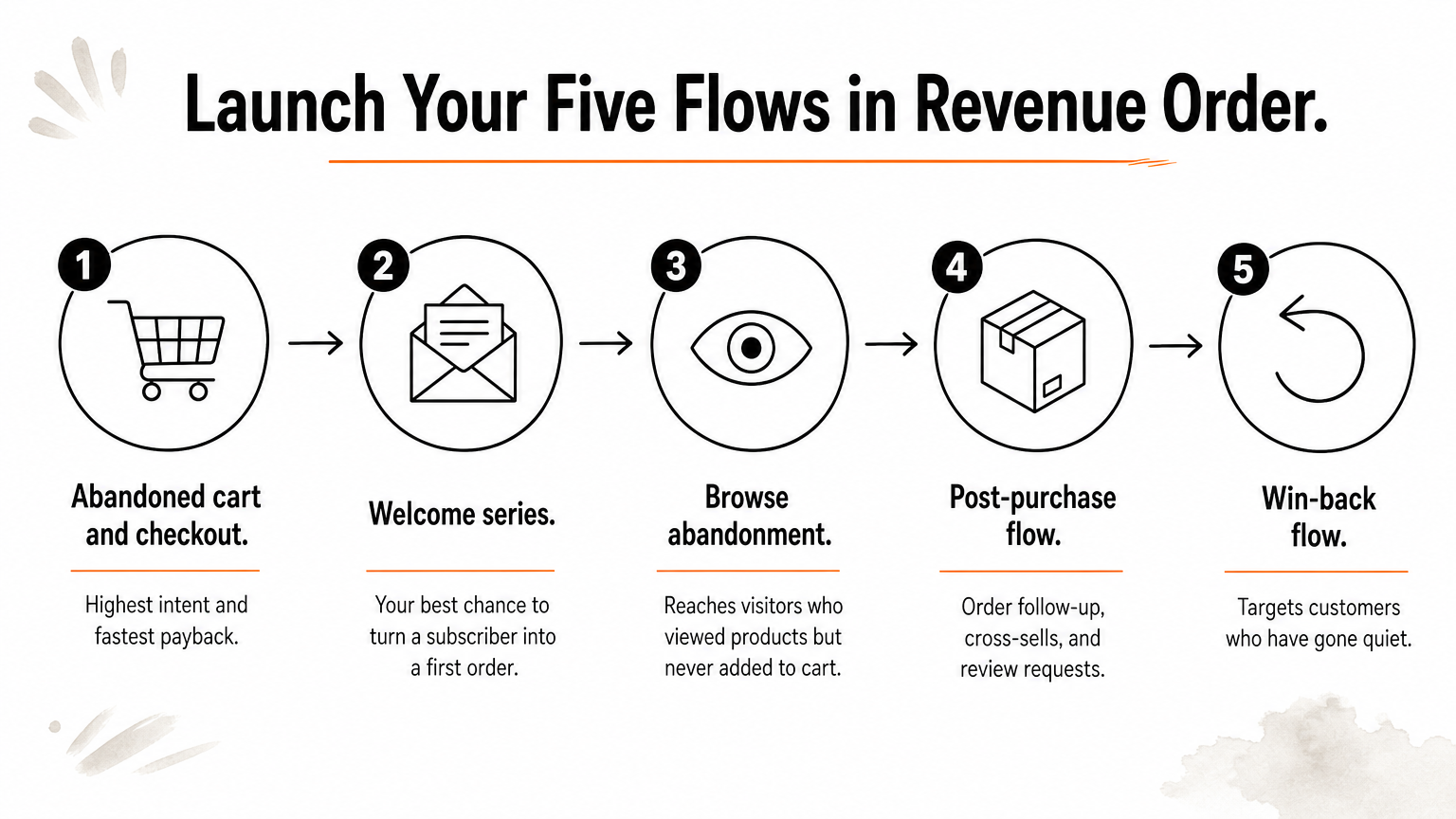
- Abandoned cart and checkout. Highest intent and fastest payback.
- Welcome series. Your best chance to turn a new subscriber into a first order.
- Browse abandonment. Reaches visitors who viewed products but never added to cart.
- Post-purchase. Order follow-up, cross-sells, and review requests.
- Win-back. Targets customers who have gone quiet.
The workflow library has more than 30 prebuilt templates, and you can filter them by goal, such as recovering visitors or driving repeat purchases. Each one starts with a branded email or SMS template, so you edit copy and timing instead of designing from scratch. Resist building fifteen flows in week one. Three well-tuned flows beat ten default ones.
Get abandoned cart, welcome, and browse flows live and tuned before you build anything fancier.
Add a sign-up form and set attribution before you send
Start with a multi-step form. The first step offers a discount for an email address, and the second invites the subscriber to add a phone number for SMS. That sequence builds both lists without scaring people off with a long form. Omnisend also offers a wheel of fortune pop-up and lets you target forms by exact URL, partial URL, UTM parameter, traffic source, or visitor location. If you collect phone numbers, make the SMS consent language explicit.
Then open Store Settings and go to Sales Attribution. There you set the attribution window and decide whether an order counts after an email open or only after a click. Omnisend also adds UTM tags to your links automatically. Set this once, because consistent attribution rules keep your revenue numbers comparable month to month.
Migrating from Klaviyo, Mailchimp, or another platform
Omnisend offers free migration support. Its published package has covered your contacts plus three workflows, five segments, three forms, and one email template. Klaviyo users also get a self-serve tool that carries over tags and segments. Plans of $400 a month and up add a dedicated customer success manager.
The package does not include template conversion or deliverability consulting. Before you commit, ask exactly what the team will rebuild. Flow logic is usually the part that needs the most attention, because a copied flow with the wrong timing or exit rules can quietly cost you revenue.
What Omnisend's core features do well and where they fall short
Omnisend is strongest where store data meets messaging: product blocks in the email editor, flows with branching and A/B tests, and segmentation on purchase behavior. It is weakest in custom reporting, form embedding options, and anything that is not ecommerce.
Email editor and templates
The drag-and-drop editor ships with 350+ templates sorted by goal, such as promoting products or announcing a sale. The standout blocks are ecommerce-specific. A product picker pulls items, prices, images, and links from your store, so you never retype product details. A product recommender fills a block with best-sellers, recently added items, most viewed products, or items above a price you set.
A discount block generates cart discounts or free shipping codes without leaving the editor. Interactive blocks such as scratch cards, gift boxes, and countdown timers are included too. Universal Layouts let you edit a header, footer, or promo strip once and have it update across multiple emails.
The template library leans heavily toward product promotions and sales events. If you want editorial or story-driven designs, expect to customize more or import your own HTML.
Automation workflows
The workflow builder offers 20+ triggers, many tied to store behavior, plus delays, conditional splits, tags, and goal-based exits. You can mix email, SMS, and push in one flow and A/B test entire paths. For example, you can test whether adding a text step to cart recovery beats email alone. Split automations are included on all plans, which some rivals reserve for higher tiers.
Quality-of-life features matter here. Trigger preview lets you test who would enter a flow before you switch it on. Frequency controls stop someone from receiving a post-purchase series and a cart recovery flow at the same time. Alerts flag logic problems before launch. What is missing is lead-management automation, such as lead scoring or CRM-style workflows, which fits Omnisend's store-first design.
Segmentation and the Customer Lifecycle Map
Segments update automatically as behavior changes. There are 30+ segment templates, and you can nest AND/OR conditions, filter by tags, and use ecommerce filters like average order value and total spent. Shopify segments sync straight in.
The Customer Lifecycle Map sorts customers into stages such as loyal, needs nurturing, and at risk, based on spend, purchase frequency, and recency. Each stage comes with suggested retention tactics. It works best once you have at least 100 customers and around 5 to 7% of them have bought recently. Below that, it falls back on general rules instead of your store's own data.
Forms, SMS, and push
Forms are a real strength. You get multi-step forms, countdown timers, wheel of fortune pop-ups, scheduling, targeting rules, and reCAPTCHA protection. The limits are practical. Embedding is done by pasting JavaScript, you cannot edit form CSS, and landing pages are for lead capture only, so you cannot build a shoppable page with checkout.

SMS sits inside the same workflows and supports text-to-join keywords. US and Canadian contacts can also receive images over MMS. Push notifications are included, and web push is unlimited on paid plans. If you sell outside English-speaking markets, note that the Omnisend interface itself is English only.
The features that cost the most elsewhere, such as split automations, omnichannel flows, and lifecycle segments, are the ones Omnisend includes by default.
AI, reporting, and deliverability in practice
Omnisend's AI saves production time, its reporting is excellent on revenue and thin on customization, and its deliverability tools are solid, but your list quality still decides your inbox placement. Each of these areas is worth understanding before you commit.
AI features that save real time
The AI assistant inside the email builder drafts full emails, continues your text, fixes grammar, and rephrases copy. A subject line generator produces several options from keywords. The most useful addition is the AI Segment Builder. You type something like "customers who bought jeans last winter" and Omnisend builds the filter for you.
There is also a forms assistant that generates sign-up forms from a prompt, AI product recommendations based on viewing and purchase history, and send-time optimization. Omnisend has also launched an MCP server, so AI assistants such as ChatGPT can connect to your account. The AI tools are available on the free plan. They are practical rather than predictive. If you need deep predictive analytics, Klaviyo goes further.
Reporting and revenue attribution
Omnisend's reporting is built around money. You see revenue per campaign, automation, and form, along with metrics like placed order rate and revenue per message. Email, SMS, and push appear in one cross-channel view. Live View shows real-time store activity such as viewed products, carts, and checkouts.
The gaps are specific. You cannot build fully custom reports, you cannot filter out bot clicks or Apple Mail Privacy Protection opens, and advanced reports such as segment performance and channel trends sit on the Pro plan. Treat open rates as a rough signal and judge your program on revenue per recipient and placed orders instead.
Deliverability tools and what they cannot fix
Omnisend guides you through SPF, DKIM, and DMARC, labels your sender domain and list hygiene as good, fair, or poor, and flags problems with steps to fix them. An email verification tool is available at about $0.20 per 100 contacts. High-volume senders can request a dedicated IP, though not everyone qualifies. The platform does not show deliverability scores, which Klaviyo does.
No platform can rescue a weak list. Gmail's sender guidelines require authentication and one-click unsubscribe from bulk senders, and they expect spam complaints to stay below 0.3%, ideally under 0.1%. Mail only engaged subscribers, prune inactive contacts, and avoid spammy subject lines, and you will avoid most problems regardless of platform.
Deliverability is decided by your list and content far more than by which platform sends the email.
Omnisend pricing: what you will actually pay
Omnisend has three plans: Free, Standard from $16 a month, and Pro from $59 a month. Price scales with your contact count, not with how much you send, and the cost per contact drops as your list grows.
The three plans compared
| Plan | Starting price | Starting contacts | Emails per month | Notable inclusions |
|---|---|---|---|---|
| Free | $0 | 250 | 500 | 500 web push, core automation and segmentation, A/B testing, AI tools |
| Standard | $16/mo | 500 | 6,000 | Unlimited web push, 24/7 support, full automation suite |
| Pro | $59/mo | 2,500 | Unlimited | Advanced reporting, monthly SMS credit allowance, account expert option |
The free plan is a real working tier, not a stripped trial, so you can run a small store on it until you outgrow 250 contacts. Pro makes sense when you need unlimited sending, advanced reports, or a larger SMS program. At 2,500 contacts, Standard runs about $35 a month against $59 for Pro, so the upgrade premium is real at smaller sizes.
Standard plan price by list size
Standard includes about 12 emails per contact per month. The table shows how the price scales.
| Contacts | Standard price | Emails per month | Cost per 1,000 contacts |
|---|---|---|---|
| 500 | $16 | 6,000 | $32.00 |
| 1,000 | $20 | 12,000 | $20.00 |
| 3,000 | $50 | 36,000 | $16.67 |
| 5,000 | $81 | 60,000 | $16.20 |
| 10,000 | $132 | 120,000 | $13.20 |
| 20,000 | $265 | 240,000 | $13.25 |
| 50,000 | $413 | 600,000 | $8.26 |
A worked example: a 5,000-contact store
Take a store with 5,000 contacts that sends 8 campaigns a month to the full list and about 12,000 flow emails. That is 52,000 emails, comfortably inside the 60,000 Standard allowance at $81 a month. Add SMS to 2,000 opted-in subscribers at 4 texts a month. That is 8,000 texts, and at roughly 1 to 1.5 cents each for US messages you spend about $55 to $120. A one-time list verification adds about $10.

| Item | Monthly cost |
|---|---|
| Standard plan, 5,000 contacts | $81 |
| SMS, 8,000 US texts | about $55 to $120 |
| Email verification (one-time, $0.20 per 100) | about $10 |
| Total | about $136 to $201 |
At 10,000 contacts, Omnisend Standard costs about $132 a month, while Klaviyo runs roughly $150 or more at the same size. The gap widens as lists grow. SMS rates vary by destination country and fall with volume, so use Omnisend's pricing calculator for your own numbers.
Budget for SMS separately, because the plan price covers contacts and email, and texting is where costs can climb.
Discounts and the partner offer
Chromex is an official Omnisend partner. Omnisend sign-ups through the Chromex link get 20% off the first 2 months, offered as cashback. If you would rather test first, the free plan lets you build and run real flows before you spend anything. Coupon codes on third-party sites change often and may not stack with other offers, so confirm any discount at checkout.
Omnisend pros and cons, including common complaints
Omnisend's pros are its ecommerce depth, omnichannel flows, revenue attribution, and pricing. Its cons are its ecommerce-only design, limited report customization, and a handful of missing integrations. The table sums up both sides.
Pros and cons at a glance
| Pros | Cons |
|---|---|
| Store sync pulls in products, customers, and orders | Not useful if you do not sell products online |
| Email, SMS, and push in one workflow | Reports cannot be fully customized |
| Revenue attribution with adjustable windows | No filtering for bot clicks or Apple MPP opens |
| Generous free plan with AI tools included | Interface is English only |
| Free migration support | No Google Analytics or CRM integrations among the main connections |
| 24/7 chat and email support on paid plans | Landing pages capture leads but have no checkout |
| Cost per contact falls as your list grows | AI is practical but less predictive than Klaviyo's |
What reviewers complain about
The recurring complaints are structural, not about bugs. People want more flexible reporting, more template variety beyond promotions, and clearer SMS budgeting, since per-message prices depend on the destination country. Teams outside English-speaking markets also hit the language limit quickly. Another common frustration comes from stores that stay on one plan while their list grows, then notice the monthly price stepping up with each contact tier.
Support gets the opposite treatment. Omnisend advertises an average response time of about four minutes on live chat, and hands-on tests have found first responses within a couple of minutes. Support scope differs by plan, so check what your tier includes. Weigh complaints against your own needs. A stock Shopify store sending promotions and flows will rarely hit these walls, while a brand with heavy custom reporting needs will.
Most Omnisend complaints describe design choices, so ask whether they affect your store before you let them scare you off.
Omnisend vs Klaviyo, Mailchimp, and other options
Omnisend usually beats Mailchimp for stores and costs less than Klaviyo, while Klaviyo keeps an edge in segmentation depth and predictive features at large scale. The comparison below uses approximate 2026 figures from third-party testing, so verify current pricing before deciding.
| Omnisend | Klaviyo | ActiveCampaign | Mailchimp | |
|---|---|---|---|---|
| Starting price | $16/mo | $20/mo | $15/mo | $13/mo |
| Free plan | Yes, 250 contacts | Yes, 250 contacts | No, 14-day trial | Yes, 500 contacts |
| About 10K contacts | ~$132/mo | ~$150/mo | ~$189/mo | ~$110/mo |
| Ecommerce depth | Native, deep | Native, deep | Good | Basic |
| SMS | Native | Native | SMS and WhatsApp | Add-on |
| Best for | Ecommerce brands | Large ecommerce brands | Automation-heavy SMBs | Beginners and newsletters |
Omnisend vs Klaviyo
Klaviyo's visual automation builder offers more prebuilt templates, and its segmentation and predictive analytics go deeper for stores with large, complex data. Omnisend counters with lower prices at most tiers, omnichannel flows that feel more integrated, and free migration help. For a store under about 50,000 contacts, we rarely see the missing Klaviyo depth change outcomes.
Omnisend vs Mailchimp, and the best free option
Mailchimp is cheaper at some list sizes and its free plan allows 500 contacts. But its ecommerce features are basic and its automation is more limited, so it suits newsletters better than stores. Omnisend's free plan has fewer contacts but includes automation, segmentation, and A/B testing that matter for revenue.
So which is the best free email marketing tool? For a store selling products, it is Omnisend's free plan. For a simple newsletter or blog, lighter tools such as MailerLite are easier and cheaper, though they lack store-native features. Brevo sells SMS at about $10 per 1,000 messages, which is cheaper than Omnisend, but it does not offer Omnisend's ecommerce features.
Pick the platform that fits how you sell, then compare prices, because a cheaper tool with no store data costs you more in lost revenue.
Who should choose Omnisend and who should skip it
Choose Omnisend if you run an online store and want email, SMS, and push in one affordable platform. Skip it if you are B2B, a creator, or a service business. These checklists make the call quick.
Omnisend is a strong fit if you
- Sell physical or digital products on Shopify, WooCommerce, BigCommerce, Wix, or a similar platform.
- Want abandoned cart, browse, welcome, and post-purchase flows running on real store data.
- Plan to use SMS and email together without stitching tools through Zapier.
- Are moving from Mailchimp or Klaviyo and want lower costs or simpler operations.
- Need a free plan that lets you test with real flows before paying.
Skip Omnisend if you
- Run a service business, a B2B sales funnel, or a newsletter that earns from subscriptions or memberships.
- Need a multi-language interface or built-in monetization tools.
- Depend on fully custom reporting or Google Analytics and CRM integrations out of the box.
- Only send a simple monthly newsletter, where a cheaper, simpler tool does the job.
When the tool is not the bottleneck
Switching platforms rarely fixes a weak email program on its own. If email drives less than 10% of your revenue, the cause is usually thin flows, generic design, poor deliverability, or too little testing. A new platform will not change that. If you lack the time or in-house expertise, a specialist team can build and optimize the program inside Omnisend or Klaviyo while you run the business.
The platform is the easy decision, and the strategy running on it decides whether email becomes a major revenue channel.
The bottom line on Omnisend
Omnisend is one of the best-value platforms for ecommerce email and SMS. It syncs your store in minutes, runs omnichannel flows on real order data, and traces revenue back to the message that earned it. Its free plan is genuinely usable, and its cost per contact falls as you grow. The trade-offs are an English-only interface, limited custom reports, and no use outside online retail.
If you sell products online, test it. Connect your store, authenticate your domain, and get abandoned cart, welcome, and browse flows live first. If you would rather hand the build and optimization to specialists, talk to Chromex about running your email and SMS program.