Omnisend Shopify: What It Is, Pricing, and How to Set It Up
The Omnisend Shopify integration is an email, SMS and web push marketing app that connects to your store and syncs your customers, products and orders. Every message can then be triggered by what shoppers actually do. You install it from the Shopify App Store, link it in a few minutes, and run abandoned cart, welcome and post-purchase flows from one dashboard. A free plan covers 250 contacts and 500 emails a month, and paid plans start at $16 a month.
Omnisend is built for ecommerce, so it reads Shopify data natively instead of treating your store as an afterthought. Shopify's own Shopify Email handles simple campaigns well. Omnisend is what many stores move to once email needs to earn real revenue, with deeper automation, segmentation, forms and SMS in one place.
This guide covers why the app fits Shopify stores, how to connect it correctly, which features matter, what it costs, and how it compares to Shopify Email and other tools. We manage email and SMS for ecommerce brands at Chromex and are an official Omnisend partner, so the setup advice below reflects how these programs get built in practice.
Why Omnisend suits Shopify stores
Omnisend suits Shopify stores because it turns store activity into messages without custom work. A cart left behind, a first order or a lapsed buyer each triggers the right email or text automatically. A generic email tool makes you wire that up yourself, and most small teams never finish the job.
What the integration syncs
Once connected, Omnisend pulls your Shopify data into one profile per contact. Customers, products and orders arrive first, followed by cart and browsing activity. That data feeds segmentation, personalization and every automated workflow. Sync speed depends on the type of data:
| Data | How fast it syncs |
|---|---|
| Historical contacts, products, orders | Within an hour for most stores, up to 24 hours for the full history |
| New orders and customer actions | Instantly or within about 3 minutes |
| Contact profile updates | Within 1 hour |
| Contact tags | Up to 24 hours |
Browsing and product view tracking works only for visitors Omnisend can recognize. That means people who have signed up through a form, clicked an email, reached checkout, or logged into their Shopify account. Also note that only contacts who gave explicit consent arrive with a subscribed email status. Everyone else syncs as non-subscribed, so you cannot send them marketing by default.
The app's value is not the sending, it is the live link between what shoppers do in your store and what they receive next.
Who gets the most from it
Omnisend pays off fastest for stores that already have traffic and a list but send only a few manual blasts. If you have more than a few hundred contacts, run paid ads, and want abandoned cart, welcome and post-purchase flows running without daily effort, you are the target user. Stores that want SMS next to email in the same workflow benefit too.
It is a weaker fit for a brand-new store with no list and no plans beyond one newsletter a month. In that case the built-in Shopify tool can carry you for a while, and we cover that trade-off in the comparison section below.
How to connect Omnisend to your Shopify store
You connect Omnisend to Shopify in one of two ways: install the app from the Shopify App Store, or start in Omnisend and enter your store URL. Either takes a few minutes. The step most people miss is the theme setting that turns tracking on.
Pick one of two install routes
If you have no Omnisend account yet, install from Shopify. In your Shopify admin, open Apps, search for "Omnisend Email Marketing & SMS", then click Add app and Install app. Follow the prompts to create the account. Your store connects automatically during registration.
If you already have an Omnisend account, connect from Omnisend instead, to avoid creating a duplicate. In the last stage of account setup, choose Connect Store and enter your store URL.
Use your xxxx.myshopify.com address, not your custom domain. You find it in Shopify admin under Settings, then Domains, listed under Shopify-managed domains. A custom domain causes connection errors, and this is the most common reason a first attempt fails.
Turn on the app embed for Shopify 2.0 themes
If your theme is a Shopify 2.0 theme, you must enable the Omnisend app embed or tracking will not work, even when the store shows as connected. Most current themes are 2.0. To check, open Online Store, then Themes, then Customize. If you see "Add section" or "Add block" in the left sidebar, you are on a 2.0 theme.
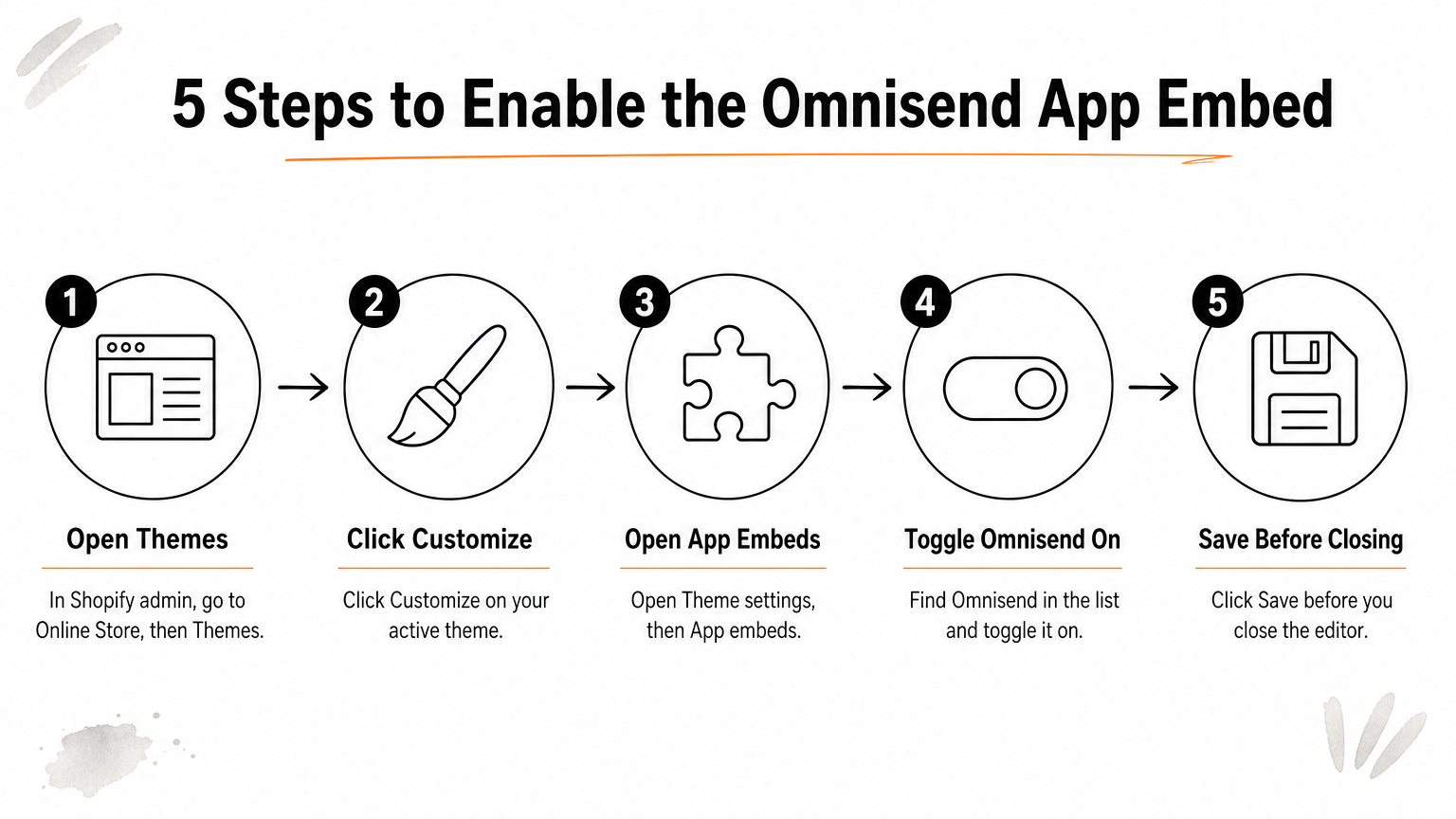
- In Shopify admin, go to Online Store, then Themes.
- Click Customize on your active theme.
- Open Theme settings, then App embeds.
- Find Omnisend and toggle it on.
- Click Save before you close the editor.
Skipping the app embed is the quietest way to break your setup, because everything looks connected while tracking does nothing.
Verify the connection and test a flow
Check three places. In Omnisend, open Store Settings and the Connected Store tab to see your store name, URL and an active status. In Shopify, confirm the app appears under Apps. Then open Audience and Contacts in Omnisend, where your customers should start appearing within an hour.
If Omnisend still asks you to connect after a Shopify install, finish the link from the other side. Go to Dashboard, Goals, Connect your store, choose Shopify and enter your myshopify URL.
Then test your order-related workflows before launch. Set the delay to immediate and use an incognito window. Use plus-addressing (you+1@yourdomain.com) for repeat tests, because abandoned cart can fire only once per day per address unless you change the trigger frequency. To trigger the order confirmation flow, go to Orders in Shopify, click Create order, add a customer and products, and click Mark as paid.
Omnisend features that matter for Shopify
The features that matter most in the Omnisend Shopify app are automation workflows, list-building forms, segmentation, reporting and the channel mix. Together they cover the whole loop: capture subscribers, message them based on behavior, and measure what earned money.
Automation workflows
Automation is the core reason to use the app. Omnisend ships pre-built ecommerce workflows for welcome series, abandoned cart, browse abandonment, post-purchase follow-ups, winback, product review requests, cross-sell and back-in-stock alerts. You can also build your own in a visual builder.
Workflows support conditional splits, so shoppers take different paths based on clicks, purchases or cart value. Email, SMS and web push can sit in the same workflow. A/B testing works on automation as well as campaigns, which lets you improve subject lines, content and timing over time instead of guessing.
List building and segmentation
Omnisend includes its own capture tools, so you do not need a separate app. You get popups, signup bars, embedded and multi-step forms, landing pages, teasers and a gamified Wheel of Fortune. Display rules include exit intent, scroll depth and time delay, and each form reports its own performance.
For targeting, Omnisend assigns lifecycle stages such as new, active and at-risk, and it ships about 20 pre-built segments. Predictive metrics like churn probability and expected customer value help you build retention campaigns. You can also build segments from purchase behavior, such as people who bought item A but not item B.
Good segmentation is where ecommerce email revenue is made, and a tool that offers lifecycle stages out of the box saves weeks of setup.
Channels, reporting and support
Email, SMS and web push run from one account. SMS is billed per message rather than bundled into the plan. In reporting, you can see revenue per workflow, click maps and deliverability data. That tells you which automations earn money and which only send volume.
Support runs 24/7 through live chat, including on the free plan. The Shopify listing also notes that Omnisend is used by 100K+ brands and now lets you build AI campaigns from ChatGPT or Claude.
What Omnisend costs on a Shopify store
Omnisend costs nothing on its free plan, then starts at $16 a month on Standard and $59 a month on Pro, with prices rising as your contact list grows. Email is included in the plan price, while SMS is charged per message on top.
Plans at a glance
| Plan | Starting price | What it covers |
|---|---|---|
| Free | $0 | 250 contacts, 500 emails a month, basic automation, signup forms, 24/7 support |
| Standard | From $16/month for 500 contacts | Campaigns, advanced automation, A/B testing, all signup tools |
| Pro | From $59/month for 2,500 contacts | Priority support and the most advanced reporting and predictive features |
Treat these as starting points, because the monthly price moves with your contact count. Check the live pricing page before you commit, since plans change. If you want a discount, Chromex is an official Omnisend partner, and sign-ups through its link get 20% off the first 2 months, offered as cashback.
A worked example against Shopify Email
Shopify Email gives you 10,000 free emails a month, then charges $0.001 per email. Take a store with 4,000 contacts sending 5 campaigns a month. That is 20,000 emails, so 10,000 are billable and the Shopify Email bill is $10 a month.

On price alone, Shopify Email wins here. Omnisend's Pro tier starts at $59 and climbs with list size, so the gap is at least $49 a month. If your average order is $80, that gap is covered by less than one extra order a month. Better flows and segments should clear that bar, but only if you actually build them.
SMS adds a separate line. At about $0.0124 per US message, 2,000 texts cost roughly $24.80. Rates vary by country, so check Omnisend's SMS pricing before you plan a big send.
Compare the extra monthly cost to the revenue the extra features can plausibly recover, not to the cheapest sticker price.
Omnisend vs Shopify Email and other options
Omnisend beats Shopify Email on automation, segmentation, channels and testing, while Shopify Email wins on simplicity and cost at low volume. Pick based on how much revenue you expect email to carry, not on which tool is built in.
Omnisend vs Shopify Email
| Area | Omnisend | Shopify Email |
|---|---|---|
| Cost | Free tier, then from $16/month | 10,000 free emails a month, then $0.001 each |
| Channels | Email, SMS, web push | Email only |
| Automation | Large library, conditional splits, multi-channel | A short set of basics such as welcome and abandoned cart |
| Segmentation | Lifecycle stages, predictive metrics, 20 pre-built segments | Basic filters and customer segments |
| A/B testing | Built in for campaigns and automation | No built-in A/B testing |
| Signup forms | Built in, including popups and landing pages | Separate Shopify Forms app |
| Reporting | Revenue per workflow, click maps, deliverability | Opens, clicks and basic sales |
| Platforms | Shopify and other ecommerce platforms | Shopify only |
Stay on Shopify Email if you are early, have a small list, send one or two campaigns a month and need only a basic cart reminder. Move to Omnisend when you want behavior-based flows, SMS, testing and segments, or when you send enough that you need to know which messages make money.
When another tool is the better call
Klaviyo is the usual rival. It goes deeper on data and customization, and its costs climb faster as your list grows. For many stores in the low thousands of contacts, Omnisend's workflow builder covers everything needed. If you run complex data models, many integrations or heavy custom logic, Klaviyo deserves a serious look.
Mailchimp suits general newsletters, but it is less tuned to ecommerce events than either. Choose by how much of your revenue depends on behavior-triggered messaging.
The right tool is the one you will configure fully, so the best platform on paper loses to a good one that actually gets built out.
Is the Omnisend app worth it for your store?
Omnisend is worth it for Shopify stores that already have traffic and a list and are ready to build real flows. It is not worth it if you will only send occasional newsletters. Your results depend more on the setup than on the logo.
A fair verdict
The strengths are clear. Setup is quick, the Shopify sync is solid, forms and SMS are included, and the workflow builder is easy to learn. The weak spots are also clear. Per-message SMS costs add up, price rises with your list, and a tool this capable takes time to learn.
If email drives under 10% of your revenue and you have a list of at least a few hundred subscribers, the upgrade is usually justified. If you have no list and no plan to build one, fix that first.
Omnisend rewards stores that build the full program, and it punishes stores that install it and leave the defaults alone.
Mistakes that cost stores money
Duplicate messages are the first trap. Omnisend does not replace Shopify's own notifications automatically. If you move abandoned cart emails to Omnisend, turn off Shopify's version in your checkout settings, under the abandoned checkouts option. Otherwise shoppers get two emails.
Second, do not uninstall to troubleshoot. Removing the app from Shopify triggers account deletion after 16 days, with warnings at 10 and 3 days. Contact support first.
Third, do not email non-subscribed contacts as if they had opted in. Only explicitly consenting contacts sync as subscribed, and that status should guide every send.
The order to build in
A sensible sequence keeps the work focused. We follow this order at Chromex:
- Days 1 to 5: audit your current email setup, fix deliverability, and write a 60-day action plan.
- Days 5 to 15: build your 8 core automated email sequences and a high-converting signup form.
- Around day 15: launch a campaign calendar with value-based campaigns that support the automations.
- Day 30 onward: test every part of the system, from subject lines to timing, so revenue compounds.
Where to go from here
Omnisend for Shopify connects your store data to email, SMS and push in one dashboard. Install it, connect with your myshopify.com URL, switch on the app embed, and test your flows before launch. Then build the automations and segments that make the cost worth it.
If you would rather hand the build to specialists, Chromex Marketing designs and runs email and SMS programs for ecommerce brands, including Omnisend setups from audit to ongoing testing.