Omnisend vs Mailchimp: 9 Differences That Decide the Winner
Omnisend vs Mailchimp comes down to what you sell. Omnisend is the better pick for ecommerce stores that want email, SMS and web push in one automation builder, with segmentation and sales reporting on every plan. Mailchimp is the better pick for service businesses, creators and small senders who mostly write newsletters, want the lowest entry price, or need its larger app marketplace. A good pick is the one whose cheap plan does not lock away the features you actually use.
Both platforms look alike on the pricing page. The differences show up later: automation capped at four steps, SMS that needs a higher plan, contact-based bills that climb, and support that ends after 30 days on the free plan. This article walks through nine of those differences with 2026 prices, plan limits and a verdict on each, so you can choose without opening another tab.
Chromex is an email and SMS agency for ecommerce brands, and we are an official Omnisend partner. We build programs on major platforms, so we know where each tool earns its fee. Weigh that partnership when you read our verdicts. We say plainly where Mailchimp wins.
1. Pricing and free plans
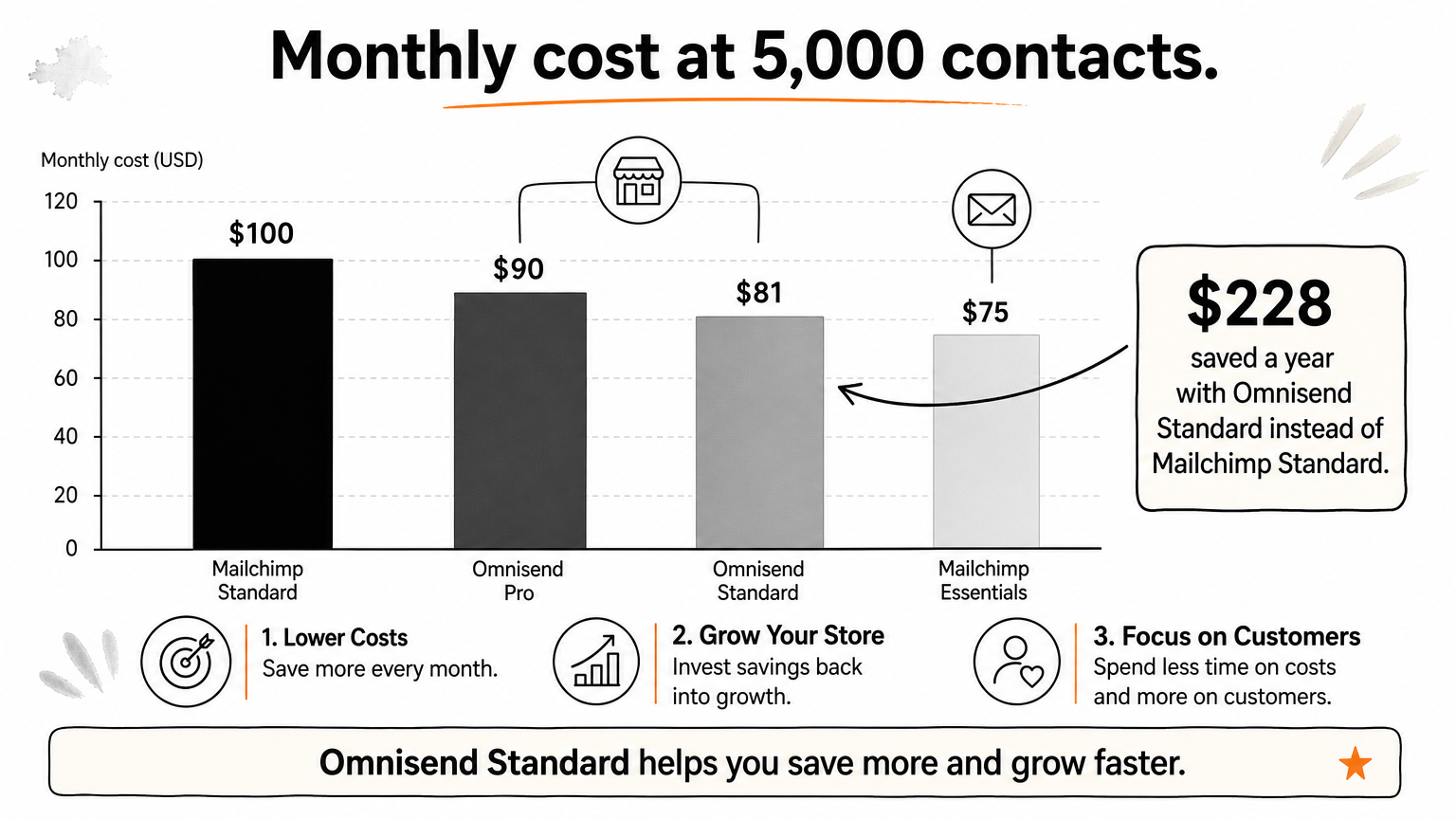
Mailchimp Essentials is the cheapest paid plan at 500 contacts and again from 5,000 up, but it locks branching automations. Compared plan for plan, Omnisend Standard costs less than Mailchimp Standard at every list size up to 20,000 contacts.
How Omnisend does it
Omnisend has three plans: Free, Standard from $16 a month, and Pro. Every plan includes automation, A/B testing, web push, transactional email and an AI segment builder. Standard sends up to 12 times your contact count each month. Pro removes the send limit and is the plan where SMS credits are sold.
The free plan covers 250 contacts and 500 emails a month, plus 500 web push messages. Omnisend bills for subscribed and non-subscribed contacts, such as checkout contacts who never opted in. Bulk-unsubscribing those non-subscribed contacts lowers the bill.
How Mailchimp does it
Mailchimp has four plans: Free, Essentials from $13 a month, Standard from $20, and Premium. Essentials sends 10 times your contact count and caps automations at four steps with no branching. Standard raises the send limit to 12 times and adds dynamic content, generative AI, send time optimization and multivariate testing.
The free plan also gives you 250 contacts and 500 emails a month, capped at 250 a day. It includes only an automation preview, and A/B testing is for paid plans. Mailchimp bills for unsubscribed contacts too. Transactional email, such as order confirmations, needs Standard plus an add-on starting at $20 per block of 25,000 emails.
Which one wins
Omnisend wins on value for stores, because its entry plan already includes what Mailchimp reserves for Standard. Here are the monthly list prices in USD at common list sizes. Check each pricing page before you buy, since both vendors change plans.
| Contacts | Omnisend Standard | Omnisend Pro | Mailchimp Essentials | Mailchimp Standard |
|---|---|---|---|---|
| 500 | $16 | n/a | $13 | $20 |
| 2,500 | $44 | $59 | $45 | $60 |
| 5,000 | $81 | $90 | $75 | $100 |
| 10,000 | $132 | $150 | $110 | $135 |
| 20,000 | $265 | $375 | $230 | $285 |
Compare plans by the features you need, not by the entry price on the pricing page.
Take a store with 5,000 contacts that needs branching cart and browse flows. Mailchimp Standard costs $100 a month, or $1,200 a year. Omnisend Standard costs $81, or $972 a year, which saves $228. If you only send newsletters, Mailchimp Essentials at $75 beats Omnisend by $6 a month, or $72 a year.
2. Ease of use and email builder
Both tools are easy to learn, and you can onboard either in minutes. Omnisend's builder is tuned for stores, while Mailchimp offers a bigger template library and more general-purpose blocks.
How Omnisend does it
Omnisend's drag-and-drop builder includes product grids, product recommendations and discount code blocks. It pulls your logo, colors and fonts from your brand assets, and two- or three-column layouts stack automatically on mobile. You can work in HTML and CSS if you want, and you can save design elements for reuse.
The library has 250+ email templates, including seven abandoned cart designs. The left sidebar leads to Forms, Campaigns and Automation. One quirk: Omnisend nudges you to connect your store early, which is mildly annoying if you only want to test the editor.
How Mailchimp does it
Mailchimp has 380+ email templates, filterable by industry, style and purpose. Its builder offers 15 content blocks, including survey, code, apps and product blocks. An Optimize button suggests fixes, such as making images clickable, and teammates can leave comments inside the editor.
Navigation also uses a left sidebar, and the Home screen shows a progress bar of what to do next. Some tools take a minute to find. The landing page builder, for example, sits under Campaigns. Mailchimp has no abandoned cart templates, so you start those from the automation library instead.
Which one wins
Omnisend wins for stores, because the product blocks, brand import and cart templates save real build time. Mailchimp wins for variety, survey blocks and team review. Both connect natively to Shopify, WooCommerce, Wix and BigCommerce, so setup effort is similar.
If your emails are mostly product-driven, Omnisend's builder gets you to send faster.
For newsletters, event invitations and service announcements, Mailchimp's wider template choice is the better fit. Ease of use will not decide this one, so let the next eight items do that.
3. Sign-up forms and landing pages
Omnisend gives stores sharper list-growth tools, mainly through targeting. Mailchimp covers the basics well and suits services and events.
How Omnisend does it
Omnisend offers 110+ form templates across pop-ups, flyouts, fullscreen forms, signup bars and a Wheel of Fortune game. Multi-step forms collect an email first and ask for a phone number or preferences afterward. You can target forms by segment, UTM parameter, page-visit count or custom site actions.
That targeting lets you show past buyers a different offer than first-time visitors. A/B testing for forms is on every plan, and a test ends once a version reaches 90% confidence. Standard adds an AI form builder. There are 8 landing page templates, which can sit on your own subdomain and go live or expire on a schedule.
How Mailchimp does it
Mailchimp has 114 pop-up templates, embedded forms and 9 landing page templates. Those pages offer 13 blocks, including products and promo codes. Pop-ups use exit intent, time on page, scroll and URL rules, and you can narrow geotargeting to region and city, which Omnisend does not do.
Its templates lean toward services: consultations, webinars, events and free shipping. Pop-up A/B testing requires Standard, and there is no AI form builder. Targeting by segment or UTM parameter is not available, which limits how personal an offer can get.
Which one wins
Omnisend wins for list growth in a store. Targeting by segment and UTM source is what lets you stop giving a returning customer the same first-order discount as a stranger.
Better forms do not just grow your list, they stop you discounting people who would have paid full price.
Mailchimp wins when you capture leads for consultations or webinars and care about regional targeting. If you can only improve one thing this quarter, fix your pop-up offer before you touch anything else.
4. Ecommerce automation
Omnisend has the stronger automation builder for stores, because every plan gets the same full tool. Mailchimp gates steps, branching and starting points by plan, so serious automation means paying for Standard.
How Omnisend does it
All 30+ automation templates are open on every plan, including Free. One workflow can mix email, SMS and web push, with up to 20 split blocks that branch on order value, product, contact properties or earlier clicks. An A/B test block can sit inside the flow.
Templates cover cart, checkout, browse and search abandonment, product abandonment, order follow-up and cancellation confirmation. Separate triggers fire when an order is placed, paid, fulfilled, canceled or refunded, and segment entry or exit can start a flow.
How Mailchimp does it
Mailchimp also has 30+ flow templates, including welcome series, purchase follow-ups, birthdays and re-engagement. On Essentials, a flow is limited to four steps with no branching or multiple starting points. For conditional logic you need Standard, which supports up to 200 flows and up to five conditions per branch.
Triggers lean on contact activity, though shopping triggers include abandoned cart, back in stock, time since last purchase and low inventory. Churn risk and predicted purchase date can start a flow before a customer lapses.
Which one wins
Omnisend wins for any store that wants conditional flows without a plan upgrade. Mailchimp's predictive triggers are a real edge once you are on Standard.
| Omnisend | Mailchimp | |
|---|---|---|
| Automation on the free plan | Yes | Preview only |
| Entry paid plan limits | None | 4 steps, no branching |
| Branching | Up to 20 split blocks | Standard, 5 conditions per branch |
| Channels in one flow | Email, SMS, web push | Email, SMS |
| Predictive triggers | No | Churn risk, purchase date (Standard) |
The platform gives you the builder, but the revenue comes from the flows you design in it.
Neither tool writes a flow strategy for you. That is the work in our Create stage, where we build all 8 core automated email sequences, plus a sign-up form, in days 5 to 15.
5. Segmentation and AI tools
Omnisend is better for segmentation, because it segments on store behavior and removes condition limits. Mailchimp counters with predictive analytics, but only on Standard.
How Omnisend does it
Omnisend ships 30+ segment templates for shopping behavior, such as window shoppers, cart adders and discount users. The AI segment builder turns a typed prompt into a full segment, and it is on every plan. Custom segments can use orders, products viewed, spend and average order value.
AI lifecycle maps group customers by recency, frequency and spend into eight stages, such as Champions and About to lose, and each stage saves as a segment in one click. Other AI tools include subject line writing, reports analysis and a connection for assistants like ChatGPT and Claude. Omnisend does not forecast purchase dates.
How Mailchimp does it
Mailchimp has 10 segment templates built around activity, including engaged, lapsed and first-time customers. On Free and Essentials, a custom segment is capped at 10 conditions with a single and/or operator. The advanced builder on Standard removes that cap and allows nesting.
Standard also brings predictive analytics: likelihood to purchase, customer lifetime value, next order date and churn risk, plus predicted demographics. Its Intuit Assist AI builds automations from prompts, and Brand Kit generates on-brand layouts. There is no AI segment or form builder.
Which one wins
Omnisend wins for most stores because the segmentation tools work on day one at the entry price. Mailchimp wins if you want forecast-based targeting and are happy to pay for Standard.
Segments built on what people bought beat segments built on how they clicked.
For a store with a few thousand customers, the lifecycle map alone is a strong reason to pick Omnisend. It tells you who to reward and who to win back this week, without any setup.
6. SMS, push and omnichannel messaging
Omnisend supports email, SMS and web push natively. Mailchimp supports email and SMS only, with no native web push. SMS is cheaper to reach on Mailchimp, though.
How Omnisend does it
Web push works on every plan, with unlimited sends on Standard and Pro. A cart flow can start with an email, send an SMS after four hours, then a push with a discount code. SMS credits are sold on Pro, starting at $10 a month for about 1,111 US messages, and the rate falls as spend rises.
Campaigns also exist for each channel, and the sales report breaks revenue down by channel. Pro adds channel trend graphs for email, SMS and push.
How Mailchimp does it
Mailchimp sells SMS as an add-on from Essentials upward, in monthly bundles that start at $20 for 1,000 credits. MMS starts on Standard. Automations can mix email and SMS, with pre-built templates for welcome, cart recovery and re-engagement.
Campaigns can go out on either channel. The cross-channel Marketing Dashboard needs Standard. Because Mailchimp does not support web push natively, you need a third-party tool to add that channel.
Which one wins
Omnisend wins on channel breadth. Mailchimp wins on how cheaply you can start texting. Work an example for a store with 5,000 contacts that wants SMS in its cart flow:
- Mailchimp Essentials with a 1,000-credit bundle: $75 + $20 = $95, but flows stay at four steps with no branching.
- Mailchimp Standard with the same bundle: $100 + $20 = $120.
- Omnisend Pro with a $10 SMS bundle: $90 + $10 = $100, with unlimited email sends and web push included.
Mailchimp is cheapest to start texting, but Omnisend is cheaper once your SMS flow needs branches.
Credit bundles are not identical, so compare cost per message in your own country before you commit.
7. Reporting and deliverability
Omnisend gives stores more useful reports on the entry plans and a dedicated deliverability dashboard. Mailchimp is strong on audience and cross-channel reporting, but much of it starts at Standard.
How Omnisend does it
Sales reports are on every plan, including Free. The Reports tab covers sales, products, campaigns, automations, forms and deliverability. The Customer Breakdown shows lifecycle stages, and Reports AI summarizes performance in plain language.
The Deliverability dashboard shows a color-coded sender health overview, domain performance (open, click, failed delivery, spam and unsubscribe rates) and a contact-quality grade with list-cleaning advice. Both platforms authenticate with SPF, DKIM and DMARC, which Gmail and Yahoo require from bulk senders.
How Mailchimp does it
On Free and Essentials, Mailchimp reports campaign opens, clicks and revenue, plus automation progress. Standard adds the Marketing Dashboard with cross-channel metrics, conversion insights and custom reports. The Audience dashboard tracks net contact growth and source performance, and Mailchimp offers geolocation and benchmark data.
There is no pre-built deliverability dashboard. You build custom reports from delivery metrics on Standard and Premium. Dedicated IPs are available for senders who want to control their own reputation.
Which one wins
Omnisend wins on usable reporting at low plan levels and on deliverability tooling. Mailchimp wins on audience analytics and breadth once you are on Standard.
Dashboards show deliverability problems, but they do not fix them.
Fixing them means authentication, list hygiene and sending habits. That is why our Analyze stage runs a full email audit with deliverability fixes and a 60-day action plan in days 1 to 5, whichever platform you use.
8. Integrations
Mailchimp has more integrations, 350+ against Omnisend's 305+, and leads in CRM and social tools. Omnisend's list is smaller but built around the ecommerce stack.
How Omnisend does it
Omnisend connects natively to Shopify, WooCommerce, BigCommerce and Wix, syncing product views, cart contents, order status and lifetime value. Its list also covers loyalty apps such as LoyaltyLion and Smile.io, and review apps such as Yotpo and Reviews.io, which feed ratings into segments.
Typeform quiz results can trigger recommendations, Gorgias tickets can inform messaging, and Canva and Figma designs sync into the image library. For anything missing, Omnisend supports Zapier, webhooks and an API.
How Mailchimp does it
Mailchimp's 350+ integrations include Shopify, WooCommerce and Stripe, plus CRM and finance tools like Salesforce, HubSpot and QuickBooks. A customer who just closed a deal can receive a different sequence than one with an overdue invoice.
Instagram engagement data feeds segments, Canva and Adobe Creative Cloud push assets into templates, and Google Analytics tracks post-click behavior. It also supports social posting on every plan, which Omnisend does not match.
Which one wins
Mailchimp wins on sheer numbers and on business tools beyond the store. Omnisend wins if your stack is loyalty, reviews and support apps around a Shopify or WooCommerce store.
Count the integrations you will actually use, not the total in the marketplace.
Check both lists for your exact apps before you decide. If your CRM or accounting tool is the data source, Mailchimp's longer list matters more than any feature gap.
9. Customer support
Omnisend gives every user live chat and email support, including on the free plan. Mailchimp's free plan loses email support after 30 days.
How Omnisend does it
All Omnisend plans get 24/7 live chat and email support, and the free plan is no exception. An AI chatbot also sits in front of the help center. Spend of $400 a month or more earns you a dedicated Account Expert for regular reviews and campaign optimization.
Omnisend has no phone support on any plan. Standard and Pro also include a migration service, which matters if you are moving from another platform.
How Mailchimp does it
Free users get email support for the first 30 days, then only help articles and an AI chatbot. Paid plans get 24/7 chat and email, and phone support is limited to Premium, which starts at $350 a month. A Customer Success Manager needs a paid plan and at least 30,000 contacts.
| Support feature | Omnisend | Mailchimp |
|---|---|---|
| Live chat | All plans | Paid plans |
| Email support | All plans | Paid plans; free plan for 30 days |
| Phone | No | Premium only |
| Dedicated manager | From $400/month spend | Paid plans from 30,000 contacts |
| Migration service | Standard and Pro | Premium |
Which one wins
Omnisend wins for small teams, since you get help during a failed flow at 2 a.m. without paying extra. Mailchimp wins only if you need phone support and can justify Premium.
Support that works on the free plan tells you how the vendor treats small accounts.
If you are migrating, ask each vendor what the migration service covers before you pay for a plan.
Which platform fits your business
Choose by what you sell and which features your plan must include. Omnisend fits most online stores, and Mailchimp fits businesses that are not mainly selling products online.
Choose Omnisend if
You run a Shopify or WooCommerce store and want automation, segmentation and sales reporting without upgrading. If you do choose Omnisend, our partner link gets 20% off the first two months, paid as cashback.
- You want email, SMS and web push in one flow.
- You need branching flows and A/B tests on a low plan.
- You want lifecycle segments built from order history.
Choose Mailchimp if
You sell services, content or events, and the newsletter is the core of your program. You can also accept a lighter feature set to keep the monthly bill low.
- You want the cheapest paid plan for a small or very large list.
- You need many CRM and social integrations.
- You rely on predictive analytics and can pay for Standard.
Picking between Omnisend and Mailchimp
For a store, the Omnisend vs Mailchimp decision is mostly settled by plan limits. Omnisend gives you branching automation, push, segmentation and support from the entry plan, and it costs less than Mailchimp Standard up to 20,000 contacts. Mailchimp vs Omnisend flips for service businesses, newsletter-led programs and teams that need a long integration list or a very cheap start.
Whichever you choose, the tool is only half the job. Flows, forms and testing decide revenue. If you want help building them, talk to Chromex about your email and SMS program.