Shopify and Email Marketing: How to Run Campaigns That Sell
To get Shopify and email marketing working together, pick one sending platform, authenticate your domain, build a few automated flows, and then layer scheduled campaigns on top. Use Shopify's built-in email tool if your list is small and your needs are simple. Move to a third-party platform such as Klaviyo or Omnisend once you need deeper segmentation and testing.
Most stores get the order wrong. They blast a discount to the whole list, land in spam, and never build the automated emails that earn money in the background. Email then stays a small slice of revenue. At Chromex, email drives an average of 45% of our clients' monthly revenue, and the gap comes down to sequence, not effort.
This guide covers the one decision you need to make first, then four steps in the order we follow with ecommerce brands: set up your foundation, build your core flows, launch campaigns, and measure and test.
Shopify Email or a third-party app?
Start with Shopify's built-in tool if you have a small list and want simple, branded sends. Choose a third-party platform when you need behavior-based segments, multi-step flows, and serious testing. The choice matters less than finishing the four steps below.
What Shopify's built-in tool does well
Shopify Messaging lets you create and send email, SMS, and WhatsApp campaigns from your Shopify admin. You can use default templates or build your own branded templates, and the data already lives in your store, so setup takes minutes.
Pricing is based on what you send, not on list size. Check the current rate in your admin before you commit. Take a store with 10,000 subscribers sending 2 campaigns a week. That is about 80,000 emails a month, and usage pricing scales with that volume. Contact-based pricing scales with the 10,000 contacts instead.
When a third-party app earns its cost
Move to an app when your questions get more specific. For example: "Who bought twice but never opened a campaign?" The table shows the typical gaps.
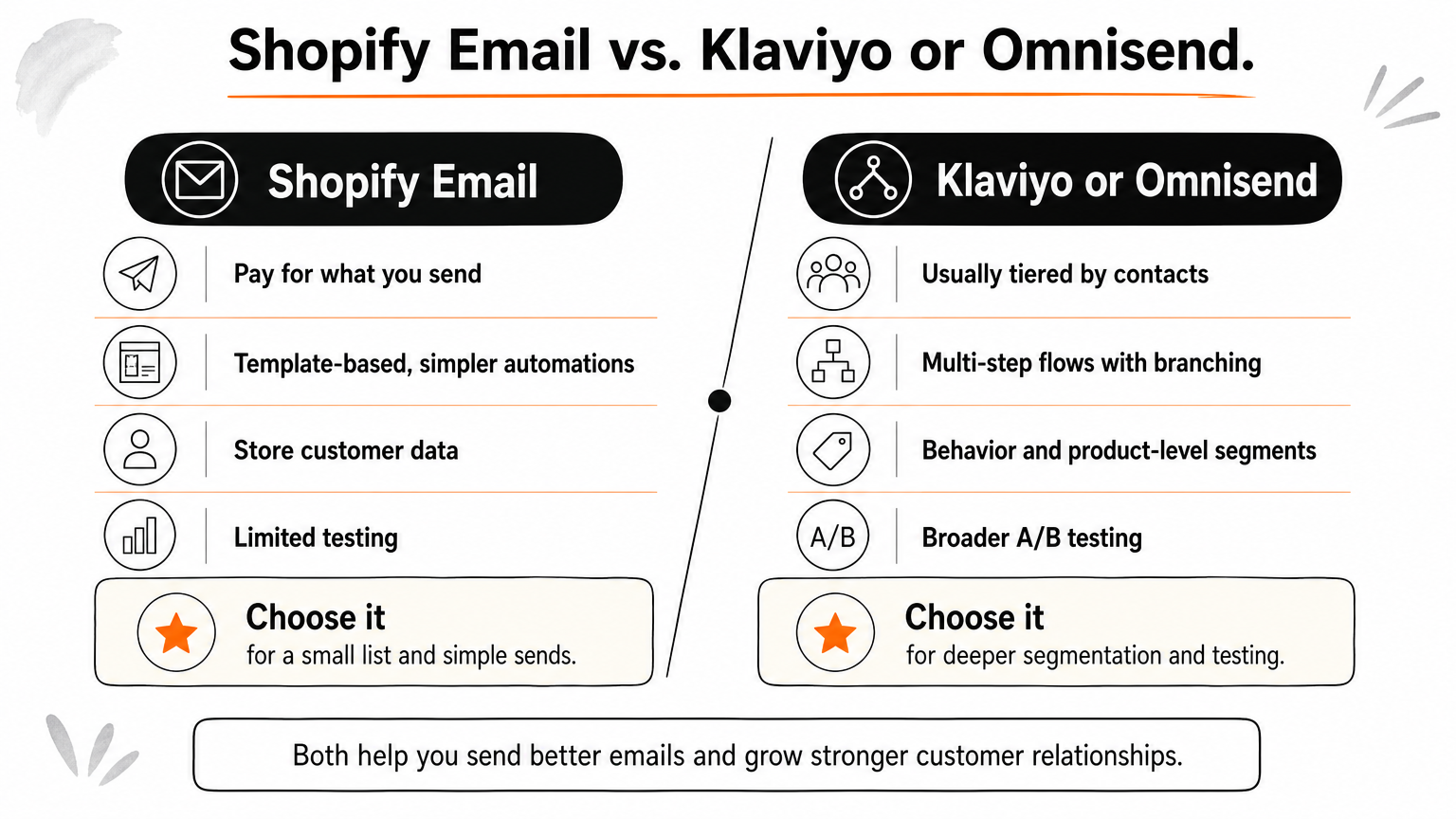
| Need | Shopify Email | Klaviyo or Omnisend |
|---|---|---|
| Pricing basis | Pay for what you send | Usually tiered by contacts |
| Automations | Template-based, simpler | Multi-step flows with branching |
| Segmentation | Store customer data | Behavior and product-level |
| Testing | Limited | Broader A/B testing |
Start with the simplest tool that can run your flows, and switch when segmentation, not price, becomes the limit.
Step 1. Set up your sending foundation
Before you send anything, connect your platform, authenticate your sending domain, and add a compliant sign-up form. Skipping this step is the most common reason Shopify email campaigns land in spam.
Authenticate your domain
Add SPF and DKIM records for your sending domain, and publish a DMARC policy. Gmail and Yahoo require authentication, easy unsubscribes, and low spam complaints from bulk senders. Google's email sender guidelines list the details. Keep complaints under 0.3%.
If you already send email, audit first. Check your inbox placement and your current flows, then write a 60-day plan. That is what our Analyze stage covers in days 1 to 5.
Add a sign-up form and stay compliant
Put one form on your homepage and one pop-up that offers a clear reason to join. Then confirm your emails meet US CAN-SPAM rules, summarized in the FTC's compliance guide:
- Include your physical mailing address.
- Make unsubscribing easy and honor requests promptly.
- Keep subject lines honest.
A clean domain and a consented list matter more than any subject line you will ever write.
Step 2. Build your core automated flows
Build automations before campaigns, because flows send to people at the moment they show intent. Begin with the five flows below and expand from there.
Start with the flows that pay first
The timings are starting points, not rules.
| Flow | Trigger | First email |
|---|---|---|
| Welcome series | New subscriber | Immediately |
| Abandoned cart | Checkout started, no order | About 1 hour later |
| Browse abandonment | Viewed products, no cart | Same day |
| Post-purchase | Order placed | After delivery |
| Winback | No purchase in 90+ days | Based on your reorder cycle |
Shopify Email includes automation templates for basics like welcome and abandoned cart. Branching flows are easier in a dedicated platform. Our Create stage builds all 8 core sequences plus the sign-up form in days 5 to 15.
Write and design for the inbox
Keep each email to one job and one button. Match your brand's fonts, colors, and voice, and check every email on a phone. Generic templates blend into the inbox, which is why we design every visual without templates.
One flow that fires at the right moment will out-earn ten campaigns sent to everyone.
Step 3. Launch your Shopify email campaigns
Once flows are live, send campaigns on a steady calendar to segments that fit the message. Campaigns carry launches, sales, and content that flows cannot.
Plan your calendar and segments
A common guide is the 80/20 rule: about 80% of sends deliver value such as stories, tips, and new arrivals, and about 20% push a direct offer. Start with one or two sends a week and send to people who engaged in the last 90 days. Widen the audience only when results hold up. Our Kickoff stage rolls out a campaign calendar around day 15.
Send your first campaign
In Shopify, the steps are:
- Open the Marketing section of your admin and create a campaign.
- Choose email and pick a template.
- Add products and one clear call to action.
- Write the subject line and preview text.
- Send yourself a test and check it on mobile.
- Schedule the send for a time your buyers are active.
Third-party platforms follow the same sequence with different menus.
A smaller, engaged segment beats your full list almost every time.
Step 4. Measure, test, and improve
Judge your Shopify email marketing by revenue, not opens. Then test one change at a time, so you know what moved the result.
Track the metrics that matter
Apple Mail Privacy Protection inflates open rates, so lean on revenue per recipient, click rate, unsubscribes, and complaints. Here is an example with made-up numbers, not benchmarks. A campaign to 10,000 recipients earning $0.10 each brings in $1,000. Lifting that to $0.12 brings in $1,200. Four campaigns a month at that lift adds $800.
Test one variable at a time
Test subject lines, offers, send times, and flow delays, one at a time. Test your flows first, since they run daily and compound fastest. We begin mass testing around day 30.
Run one clean test a week, and a year from now you will have 50 answers.
Start small, then build on it
Shopify and email marketing works when you do things in order. Pick a tool that fits your list today, authenticate your domain, build your core flows, send campaigns on a calendar, and test every week.
If you would rather hand this off, Chromex Marketing audits your email program and builds and runs flows and campaigns for ecommerce brands.