5 Ecommerce Email Marketing Templates to Copy and Send
If you need a template email marketing ecommerce stores can use right away, start with five: welcome, abandoned cart, post-purchase, promotional, and win-back. A good template has one job, one call to action, and clear placeholders you can fill in within minutes. New stores should build the welcome and abandoned cart templates first, because they respond to the clearest buying signals. Stores with a list and some order history should add the other three.
Most ecommerce email marketing templates online are design galleries. You get a nice layout and no words, so you still stare at a blank subject line. Each template below includes the subject line, preview text, and body copy, plus when to send it and what to change so it sounds like your brand. Paste the copy into Klaviyo, Omnisend, or whatever editor you use.
At Chromex Marketing, we run email and SMS programs for ecommerce brands, and we design every client email from scratch instead of using templates. So treat these as copy skeletons. They get your first sends out fast, and you refine the design and offers as your data comes in.
1. Welcome email template
When to send it
Send the welcome email immediately after signup, because the subscriber's interest is highest in that moment. Use it to set expectations, point to your bestsellers, and deliver any first-order offer. Keep it to one primary button.
A welcome email earns its place by sending the subscriber to your best products, not by telling your life story.
Copy-and-paste template
Subject: Welcome to [Brand], [First name]
Preview: Here's where most people start

Hi [First name],

Thanks for joining [Brand]. We [one-line promise, e.g. make
durable gear for everyday runners].

Most new customers start with one of these:
- [Bestseller 1]
- [Bestseller 2]
- [Bestseller 3]

[Button: Shop bestsellers]

Your welcome offer: [Offer, e.g. free shipping on orders over $50].
Code: [CODE]

Questions? Reply to this email. A real person reads it.

[Name], [Brand]
How to customize it
Swap in your real best-selling products and a one-line promise customers can repeat back to you. If you offer a discount, state the terms and expiry in the email. If you don't, replace the offer with free shipping or a returns guarantee.
2. Abandoned cart email template
When to send it
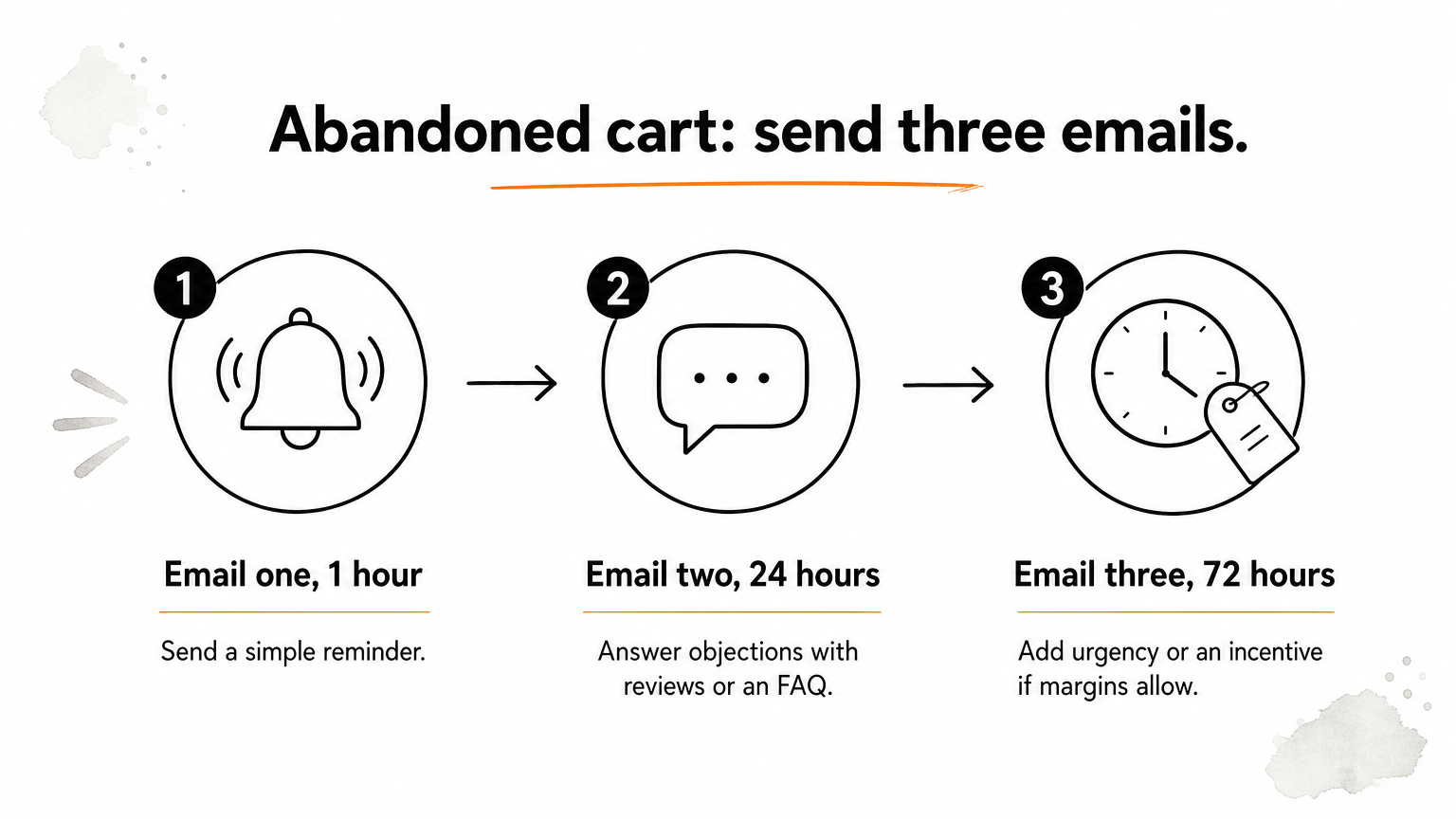
Send three emails: one hour after the abandonment, one at 24 hours, and one at 72 hours. The first is a simple reminder, the second answers objections, and the third adds urgency or an incentive if your margins allow.
Treat abandoned cart emails as a conversation about doubts, not a nag about a forgotten item.
Copy-and-paste template
Subject: Still thinking it over, [First name]?
Preview: We saved your cart

Hi [First name],

You left [Product name] in your cart, so we saved it for you.

[Product image]
[Product name], [Price]

[Button: Return to your cart]

Not sure about size, shipping, or returns?
- Shipping: [Shipping policy]
- Returns: [Returns policy]
- Help: Reply and we'll sort it out.

[Name], [Brand]
How to customize it
For email two, replace the body with reviews or an FAQ for that product. For email three, add a deadline or a small incentive. Always show the product image and price, since that is what the shopper remembers.
3. Post-purchase email template
When to send it
Send a thank-you and usage email a day or two after the order ships, then a review request once the product has had time to arrive and be used. This is the cheapest email you will send, because the customer already trusts you.
The best post-purchase email makes the product work for the customer before it asks for anything.
Copy-and-paste template
Subject: Your [Product name] is on its way
Preview: A quick tip to get the most from it

Hi [First name],

Thanks for your order. Your [Product name] should arrive by
[Date].

To get the best results:
1. [Tip 1]
2. [Tip 2]

Need help? Reply here or visit [Support link].

[Button: See the full how-to guide]

[Name], [Brand]
How to customize it
Use real instructions that cut down support tickets, such as sizing, care, or setup. For the review request, send a separate short email with one question and one button. Hold cross-sells until the review email so the first message stays clean.
4. Promotional email template
When to send it
Send a promotional email for sales, launches, and restocks, ideally to engaged subscribers first. Plan a calendar of campaigns around your key dates so promotions support your automated flows instead of competing with them.
One offer, one deadline, one button: promotions fail when they ask the reader to decide too much.
Copy-and-paste template
Subject: [Sale name]: [Benefit] through [Date]
Preview: [Short reason to open]

[Headline: the offer in six words or fewer]

Hi [First name],

[One sentence on the offer and why it matters now.]

[Product 1 image] [Name], [Price]
[Product 2 image] [Name], [Price]
[Product 3 image] [Name], [Price]

[Button: Shop the sale]

Ends [Date and time, time zone]. [Terms in one line.]

[Name], [Brand]
How to customize it
Match the offer to the audience. Segment by purchase history so repeat buyers see different products than first-time shoppers. Keep the subject line specific, and state the end time clearly so the deadline feels real.
5. Win-back email template
When to send it
Send a win-back email to customers who haven't bought or clicked in a period that fits your product cycle. A coffee brand might use 60 days, while a furniture store might wait six months. Send it only to those lapsed customers.
Win-back works best when it gives lapsed customers a reason to return, not just a reminder that you exist.
Copy-and-paste template
Subject: It's been a while, [First name]
Preview: Here's what's new at [Brand]

Hi [First name],

We haven't seen you in a while, and a lot has changed.

New since your last order:
- [New product or improvement 1]
- [New product or improvement 2]

[Button: See what's new]

If you'd rather hear from us less often, you can update your
preferences here: [Preferences link].

[Name], [Brand]
How to customize it
Lead with something new, such as a product, a feature, or a policy. Add an incentive only in a second email, so you don't train customers to wait for discounts. If nobody opens after two attempts, suppress them, since protecting deliverability matters more than one more send.
Start with two, then build out
Pick the welcome and abandoned cart templates, fill in the placeholders, and get them live. Then add post-purchase, promotional, and win-back emails as your list grows. Measure each one by revenue, not just opens, and test one change at a time.
If you want these flows built, designed, and tested by a team that does it for ecommerce brands every day, talk to Chromex Marketing about your email program.