Omnisend Email Marketing: What It Is and Who It's Best For
If you run an online store, you have probably seen Omnisend pop up next to Klaviyo and Mailchimp and wondered which one deserves your list. Omnisend email marketing is a platform built for ecommerce that combines email, SMS, and push notifications in one place. It connects to stores like Shopify, WooCommerce, and BigCommerce, so customer and order data flows straight into your campaigns.
So, what is Omnisend used for? Mostly automated revenue flows: welcome series, abandoned cart emails, post-purchase follow-ups, and win-backs, plus regular campaigns and sign-up forms. It fits best for small to mid-sized stores that want email and SMS under one roof without a steep learning curve. Brands that need very deep segmentation or heavy customization may lean toward Klaviyo.
Below, we cover the core features, pricing, how Omnisend compares with Mailchimp and Klaviyo, and which stores it suits. We are an official Omnisend partner and also work in Klaviyo every day, so you get an operator's view, not a sales pitch for one tool. Fit matters more than features.
Why Omnisend matters for ecommerce stores
Ecommerce stores pay for traffic, then watch most of it leave without buying. That is the gap Omnisend is built to close. Omnisend marketing turns browsing and purchase behavior into automated messages that bring shoppers back, and it does so inside a tool designed around products, carts, and orders rather than newsletters.
Email protects your margin as ad costs climb
Rising ad costs make owned channels more valuable every year. Your email and SMS lists belong to you, and sending a message costs a fraction of buying a click. A healthy list lets you recover sales you already paid to attract, without raising your ad budget.
Our own client data shows the scale. Email drives an average of 45% of monthly revenue across the stores we manage, and one brand reached nearly 70%. Stores stuck under 10% usually share the same problem: weak or missing flows, not a shortage of subscribers.
What makes Omnisend different from a generic email tool
Generic tools treat your store as an afterthought. If you are asking what Omnisend is at its core, the answer is an ecommerce-first platform where store data is the starting point. Omnisend ecommerce marketing automation reads what shoppers view, add to cart, and buy, then triggers the right message without you wiring each step by hand.
Product pickers pull images, prices, and stock straight from your catalog.
Pre-built workflows cover welcome, cart, browse, and post-purchase moments.
Email, SMS, and push live in one workflow, so channels do not compete.
Segments use shopping behavior, such as products viewed or order value.
Here is how shopper actions map to messages in a typical setup:
Shopper action | Automated message |
|---|---|
Subscribes | Welcome series |
Views a product and leaves | Browse abandonment |
Adds to cart and leaves | Abandoned cart |
Buys | Order confirmation, review request |
Goes quiet | Win-back |
Because everything sits in one workflow builder, you can send an email first, then follow with an SMS only to people who did not open it. Fewer tools means fewer integrations to break, and you get one view of each customer instead of three partial ones.
Where Omnisend fits in your revenue stack
Think of it as the retention layer that sits on top of your ad spend. Paid traffic fills the top of the funnel, and Omnisend works on the people already inside it: new subscribers, abandoned carts, first-time buyers, and lapsed customers.
Ads rent attention, while your email and SMS list is attention you own.
Before you pick a platform, run a quick check. Pull the last 90 days and see what share of revenue email drives. If it sits under 10%, you likely have room to grow through flows alone. If you already run complex segmentation across a large catalog, your needs change, and we cover that tradeoff in the comparison below.
How to get started with Omnisend email marketing
Setup takes an afternoon, but the order you do it in decides your results. This is the sequence we follow when we move a store onto Omnisend email marketing, and it works for DIY setups too. Skip a step and you usually pay for it later in deliverability or lost revenue.
Connect your store and import contacts
Create your account and connect your store first. Shopify, WooCommerce, and BigCommerce have native integrations that sync products, orders, and customers. Wait until the sync finishes before you build anything, because every flow and product block depends on that data.
Import contacts second. Upload only people who gave consent, such as subscribers and past buyers, and keep their sign-up source in a field. Never upload a purchased list. It wrecks your sender reputation within a few sends.
Authenticate your sending domain
Deliverability is the step most new users skip. Set up a custom sending domain with SPF, DKIM, and DMARC records so inbox providers know your mail is really yours. Then warm up gradually, starting with your most engaged subscribers.
Add the DNS records Omnisend gives you and confirm they verify.
Send your first campaigns to people who opened or bought in the last 90 days.
Watch bounces and spam complaints, and keep complaints under 0.1%.
Launch flows before campaigns
Build in this order, because each step feeds the next:
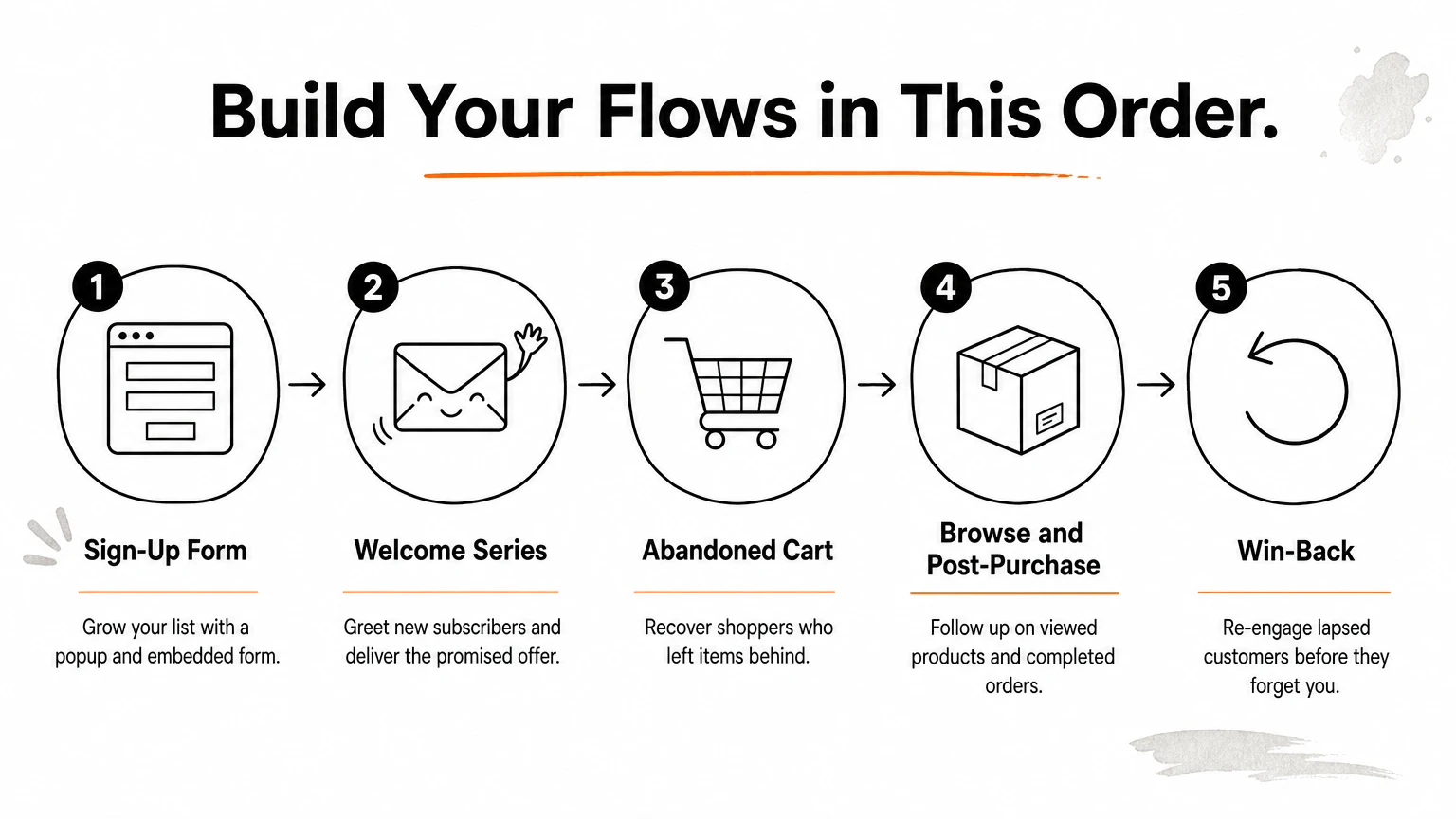
Sign-up form (a popup plus an embedded form) to grow your list.
Welcome series for new subscribers.
Abandoned cart flow.
Browse abandonment and post-purchase flows.
Win-back flow for lapsed customers.
Turn on your flows before you send a single newsletter, because flows earn money while you sleep.
Flows run every day without you, so they pay back your setup time while you plan campaigns. In our own process, the core automations go live between days 5 and 15, and a campaign calendar starts around day 15 to support them.
Signing up through our Omnisend partner link gets you 20% off the first 2 months, offered as cashback. It is a small saving, but it softens the cost of your first quarter on the platform.
What Omnisend is used for: core features
Stores use Omnisend email marketing for five jobs: sending campaigns, running automations, texting customers, growing the list, and tracking revenue by message. Here is what each job looks like in practice.
Campaigns and the drag-and-drop builder
Campaigns are your one-off sends, like a product launch or a seasonal sale. The drag-and-drop editor lets you add product blocks that pull live images and prices, plus discount code blocks. Before a big send, you can A/B test subject lines and content on part of your list.
Templates get you live fast.
Product blocks save you from copying prices by hand.
Custom designs stand out more in a crowded inbox.
SMS and push notifications
SMS works best for time-sensitive messages: flash sales, back-in-stock alerts, and shipping updates. Push notifications reach shoppers through their browser, which helps when you want a light nudge without filling an inbox. SMS usually costs extra on top of your plan, and we cover that in the pricing section.
My rule is simple. Email explains, and SMS nudges. If you text every campaign, people unsubscribe, so reserve SMS for moments where timing changes the outcome.
Use email to tell the story and SMS to prompt the click.
Forms and list growth
Forms are how you build the list that everything else depends on. Omnisend offers popups, embedded forms, and gamified forms like a spin-to-win wheel. A single form can collect consent for both email and SMS, so you do not need separate sign-up steps.
Segmentation and reporting
Segments let you target by behavior, such as products viewed, order count, or last purchase date. Reports then show how much revenue each campaign and automation produced. That matters more than open rates, because revenue per send tells you what to repeat.
Feature | What you use it for |
|---|---|
Campaigns | Launches, sales, newsletters |
Automations | Welcome, cart, post-purchase flows |
SMS and push | Urgent, time-sensitive messages |
Forms | Growing your list |
Segments | Targeting by shopping behavior |
Reports | Tracking revenue per message |
How Omnisend automates ecommerce marketing
Every automation in Omnisend email marketing follows the same logic. Something happens, the platform waits, checks a rule, then sends. Once you know those pieces, you can read any workflow in your account and fix it when it underperforms.
The building blocks of a workflow
Triggers are mostly store events, such as a cart update, a new order, or a form sign-up. Omnisend ecommerce marketing automation then chains simple blocks after the trigger:
Block | What it does | Example |
|---|---|---|
Trigger | Starts the workflow | Shopper adds a product to cart |
Delay | Waits before the next step | Wait 4 hours |
Condition | Checks a rule | Has the order been placed? |
Split | Tests two paths | 10% off vs. free shipping |
Action | Sends or updates | Email, SMS, push, tag |
Delays and conditions matter most. A well-timed delay keeps you from emailing someone who is still shopping, and a condition check stops a cart reminder once the order goes through.
Multichannel logic that controls cost
Branching by channel is where the tool earns its keep. You can send an email, wait 24 hours, and check whether the person opened it. If not, text only the contacts who gave SMS consent. That keeps your SMS spend focused on people who still need a nudge, since every text costs you credits.
You can also tag contacts inside a workflow. Tag buyers from a discount flow, for example, and exclude them from the next promotion.
Where automation still needs a human
Pre-built workflows are a starting point, not a finished program. Most stores leave the default timing and generic copy untouched, then wonder why results are flat. Overlap is the other common mistake. A shopper can land in a cart flow, a welcome series, and a sale campaign on the same day.
A flow is only as good as its trigger, its timing, and the rule that stops it.
Fix this with a quick audit. Open each workflow, confirm the exit conditions, and review revenue per message once a month. Replace the weakest email first, then test one change at a time, such as the subject line or the offer.
Omnisend flow examples you can copy
Copy these three flows before you invent your own, or browse 12 ecommerce email automation flows for more ideas. The timings below are starting points we use with clients, not rules, so test them against your own repurchase window and adjust. Most Omnisend email marketing programs earn their first real revenue from these flows.
Abandoned cart flow
Start here, because it recovers revenue fastest. Three messages over about three days work for most stores. Send the first email within one to four hours, while the shopper still remembers the product.
Step | Timing | Message | Channel |
|---|---|---|---|
1 | 1 hour | Reminder with product image, no discount | |
2 | 24 hours | Answers to shipping, returns, and reviews | |
3 | 48 to 72 hours | Small incentive or low-stock note | Email, then SMS if unopened |
Hold the discount until step three. Otherwise you train shoppers to abandon carts on purpose. Add a condition after each send so the flow exits the moment an order is placed.
Earn the click with a reminder first, and pay for it with a discount last.
Welcome series
New subscribers are warm, so this flow usually draws strong open rates. Run three emails across about a week:
Immediately: deliver the promised offer and tell your brand story in a few lines.
Day 2: show best sellers with reviews or other social proof.
Day 5: remind them the code expires, and text those who opted in to SMS.
Post-purchase and win-back flows
After a purchase, send the order confirmation, then a review request about a week after delivery. Follow with a complementary product suggestion. For win-back, trigger the flow at roughly 1.5 times your usual reorder gap, so you reach people before they forget you.
Subject lines are the easiest part to borrow. Swap in your own brand voice and keep them short, since most inboxes cut off long ones on mobile.
Omnisend pricing and the free plan
Omnisend pricing looks simple until you add SMS and list growth. The plans are tiered by contacts and monthly email volume, and texting is billed separately. Plan names and limits change, so treat the figures below as a guide and confirm them on Omnisend's pricing page before you commit.
What each plan includes
There are four tiers. Every one of them runs on the same ecommerce data, so the real differences are volume, reporting, and support.
Plan | Best for | What to expect |
|---|---|---|
Free | Brand-new stores testing email | Small contact and send caps, core automation |
Standard | Growing stores with steady traffic | Higher send volume, A/B testing, full automation |
Pro | Scaling stores with larger lists | Advanced reporting, priority support, more sending room |
Enterprise | High-volume brands | Custom pricing and dedicated help |
Paid plans start in the low double digits per month for small lists. Cost then climbs as your list grows, which is normal for Omnisend email marketing and every rival platform.
What drives your real bill
Contacts set your base price, but email volume decides whether you stay on a plan. If you send daily to a 5,000-person list, you will hit send caps long before you hit contact caps. Check both numbers before you pick a tier.
SMS is the line item that surprises people. You buy SMS credits on top of your plan, and the cost per text depends on the destination country. Because of this, the channel branching we covered earlier pays for itself, since you only text people who ignored the email.
Is the free plan enough?
The free plan works as a proving ground, not a long-term home. It lets you connect your store, build a sign-up form, and launch a welcome series and abandoned cart flow. That covers the flows that earn money first.
Expect to outgrow it fast. Once your list passes the cap or you want A/B testing, upgrade to Standard. Do it the week you notice flows are earning, not before.
Start free to prove the flows work, then pay only when the revenue covers the plan.
One more saving: signing up through our partner link gives you 20% off the first two months, which stretches the first paid quarter a bit further.
Omnisend vs Mailchimp vs Klaviyo
Most stores shortlist these three tools, and they solve different problems, which is also why our Klaviyo vs Mailchimp comparison is worth a read. Mailchimp began as a newsletter tool and grew outward. Klaviyo and Omnisend email marketing were built for online stores from day one, but Klaviyo goes deeper on data while Omnisend goes simpler on setup.
Side-by-side comparison
Omnisend | Klaviyo | Mailchimp | |
|---|---|---|---|
Built for | Ecommerce | Ecommerce | General marketing |
Segmentation | Strong, behavior based | Deepest of the three | Basic to moderate |
Channels | Email, SMS, push in one workflow | Email and SMS | Email first, SMS more limited |
Learning curve | Gentle | Steeper | Gentle |
Cost as list grows | Usually lower | Usually higher | Can climb quickly |
Best fit | Small to mid-sized stores | Large catalogs, data-heavy teams | Newsletters, mixed businesses |
Pricing models differ, so compare quotes at your own list size rather than the entry price. Then add SMS credits to each, because texting is billed on top of the plan almost everywhere.
Where each tool wins
Klaviyo wins on depth. Its segmentation, predictive metrics, and reporting suit stores with large catalogs and someone who enjoys digging into data. The tradeoff is a steeper learning curve and a bill that tends to rise faster as profiles grow.
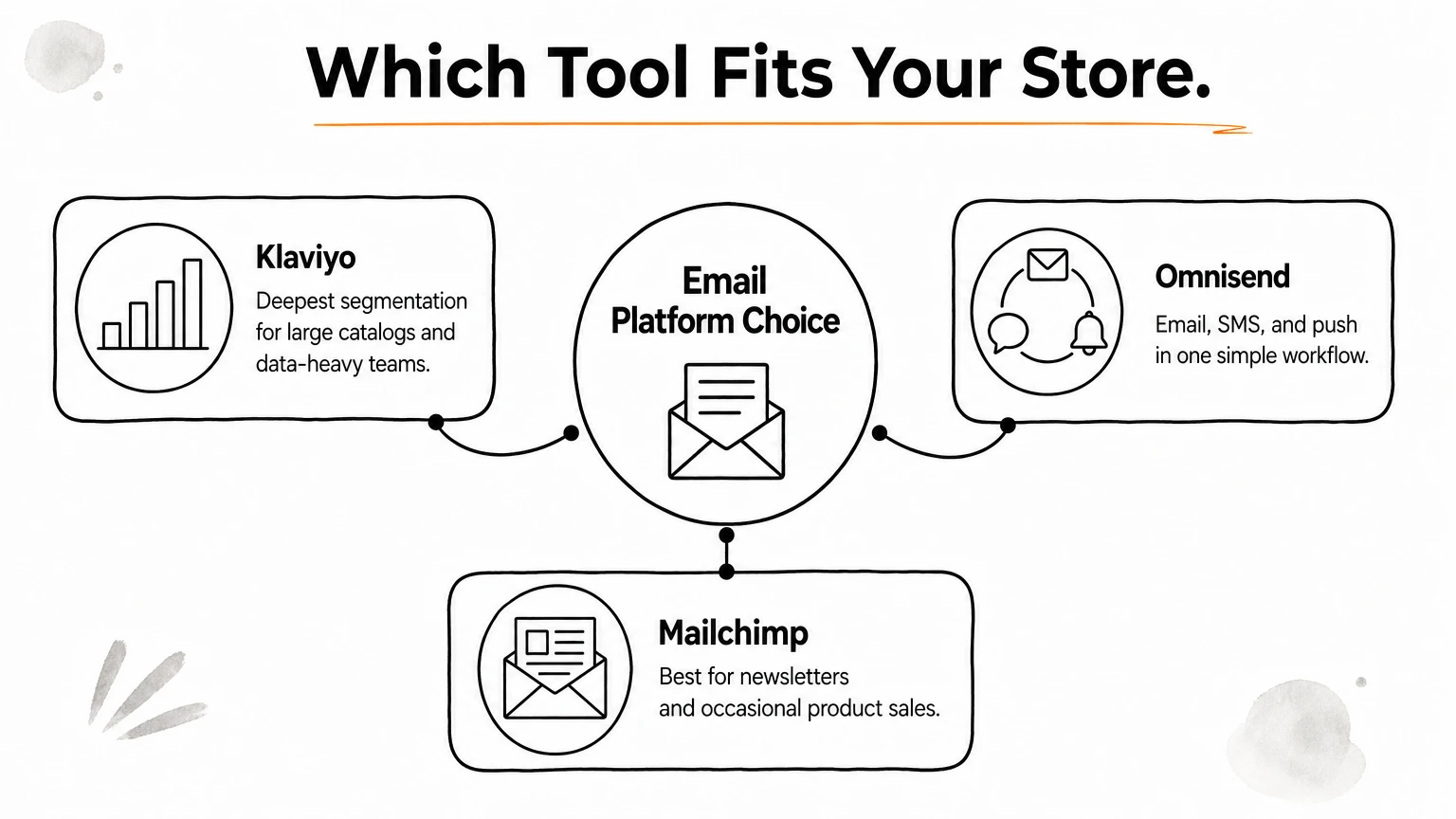
Omnisend takes the middle ground. You get email, SMS, and push in one workflow and ecommerce data from day one, without needing an analyst to build it. For most stores under a few thousand orders a month, that is enough power.
Mailchimp makes sense when ecommerce is not your main business. A publisher with a small shop on the side can live there happily. A store that depends on cart and browse automation will hit its limits sooner.
Pick the tool that matches the program you will actually run, not the one with the longest feature list.
How to choose
Run your own numbers before you decide. Our rule of thumb, after working in Omnisend and Klaviyo every week:
Choose Omnisend if you want email and SMS together, a faster launch, and a lower bill.
Choose Klaviyo if you need advanced segmentation, many product lines, or a data-driven team.
Choose Mailchimp if you mainly send newsletters and sell products occasionally.
Switching later is possible, but it means rebuilding flows and warming up a new sending setup. Choosing well the first time saves weeks of rework.
Is Omnisend any good? Pros and limitations
Yes, for the right store. Omnisend email marketing earns solid reviews from small and mid-sized shops because it is quick to launch and does what it promises. It also has real gaps, and you should know them before you move your list.
Where Omnisend is strong
Most praise centers on speed and value. We have built these flows many times, and a working welcome series and abandoned cart flow can go live in a day. Email, SMS, and push share one workflow builder, so you also skip the integration headaches of stitching tools together.
Pre-built ecommerce workflows that need only light edits.
Product blocks that pull live prices and images.
Channel branching that keeps SMS spend under control.
A bill that usually stays lower than Klaviyo's as your list grows.
Where it falls short
Segmentation is the main limit. Behavior-based groups work well, but stores with huge catalogs or layered logic will find Klaviyo's data tools deeper. Reporting follows the same pattern. You get revenue per message, yet predictive metrics and custom analysis are thinner.
Omnisend trades some data depth for speed, and for most stores that is a good trade.
Smaller catches show up in daily use. SMS credits add cost on top of your plan, and the free plan caps arrive fast. Design is another one. Built-in templates look like everyone else's unless you customize them to your brand, and generic emails blend into the inbox. Integrations cover the major store platforms, but the app list is generally narrower than Klaviyo's.
Our verdict
After working in both platforms every week, we rate Omnisend as a strong choice under a few thousand orders a month. Judge it by revenue per message, not by feature counts. The sign that you have outgrown it is simple: you keep building manual workarounds to create segments the tool cannot handle cleanly. Until then, the tool is rarely your bottleneck. Weak timing, generic copy, and missing flows cost you more.
Who Omnisend is best for (and who should skip it)
Fit decides whether Omnisend email marketing pays off. The platform is solid, but it rewards one kind of store and frustrates another. Here is how to tell which kind you run, so you pick the right tool before you move your list.
Stores that should choose Omnisend
Omnisend suits small to mid-sized stores that want results without hiring an analyst. If your catalog runs from a few dozen to a few hundred products and you want email and SMS in one workflow, the fast setup and lower bill are real advantages. It also works well for first-time email programs, where the goal is simply to get welcome, cart, and post-purchase flows live.
You are a strong match if most of these describe you:
You sell on Shopify, WooCommerce, or BigCommerce.
You ship under a few thousand orders a month.
Email drives less than 10% of your revenue, and your flows are thin or missing.
You want SMS and email together, not two separate tools.
Your team is small, with no dedicated data person.
Stores that should skip it
Skip it if your program depends on deep data. Stores with very large catalogs, layered segments, or a need for predictive analytics will feel boxed in. Teams already running well in Klaviyo should also think twice, because migration means rebuilding every flow and warming up a new sending setup.
Choose Omnisend for speed and value, and skip it when your strategy needs data depth.
Publishers with a side shop belong in a different bucket. If you mostly send newsletters and sell a few products, Mailchimp can cover you for less effort. Omnisend would be more tool than you need.
A quick fit test
Ask yourself what you will actually build in the next six months. Then match that plan to the table below, and be honest about your team's time and data skills, since a powerful tool nobody has time to use earns nothing.
Your situation | Better fit |
|---|---|
Small team, low email revenue share, want email and SMS together | Omnisend |
Huge catalog, custom segments, analyst on staff | Klaviyo |
Mostly newsletters, occasional product sales | Mailchimp |
Little time to build and test | Any of them, run by an agency |
When to hire an Omnisend email agency
Hire help when the software is not your bottleneck, your time is. A good platform still needs someone to plan, build, test, and read the numbers every week. If nobody on your team owns Omnisend email marketing full time, revenue stalls even when the setup is technically fine.
Hire an agency for the hours and the expertise, not for the software.
Signs it is time to hire
Most founders wait too long. They patch flows between product launches and blame the platform when results stay flat. Check this list honestly:
Email drives under 10% of revenue after six months.
Your flows still run on default timing and generic copy.
Open rates or inbox placement dropped and nobody knows why.
A freelancer went quiet, or reports read like a puzzle.
You want to add SMS but worry about cost and consent rules.
Two or more of these usually mean you have outgrown DIY, even if the list itself is healthy.
What a good agency should deliver
Look for a defined process with dates, not vague promises. Here is the sequence we use on every account, whether the store runs Omnisend or Klaviyo:
Timing | Work |
|---|---|
Days 1 to 5 | Full email audit, deliverability fixes, competitor insights, 60-day action plan |
Days 5 to 15 | The 8 core automated flows and a high-converting sign-up form |
Around day 15 | Campaign calendar with value-based campaigns that support the flows |
Day 30 onward | Constant testing of every part of the system to compound revenue |
Custom design matters too. Templates blend in, so ask whether visuals are built around your brand. Reporting should be in plain language and tied to revenue, not just opens.
How to vet an agency
Ask for case studies with real revenue numbers, and check that the team works in your platform daily. At CHROMEX, for example, one case study produced $500,000+ for a single brand, with email driving nearly 70% of its monthly revenue. Numbers like that show an agency designs for revenue, not vanity metrics.
Finally, look at pricing. Performance-based, scalable pricing keeps incentives aligned, while rigid packages can leave you paying for work you never use. Also ask who actually writes your emails, because hand-picked experts beat a rotating cast of juniors every time.
Picking the right email platform for your store
Omnisend email marketing works best for small to mid-sized stores that want email and SMS in one place, a fast launch, and a bill that stays reasonable. Klaviyo suits big catalogs and data-heavy teams, and Mailchimp suits newsletters. The right pick is the tool that matches the program you will actually run, not the one with the longest feature list.
Whatever you choose, the platform is only the starting line. Revenue comes from sharp timing, brand-matched design, and steady testing. Most stores stay under 10% email revenue because nobody owns the work, not because they picked the wrong software. Fix that first, and the tool matters far less.
If you would rather hand that work to specialists, meet the CHROMEX team and book a call. We will audit your setup, build your flows, and turn email into a major revenue channel for your store.