Omnisend Discount Code: 4 Ways to Save and Set Up Coupons
The best Omnisend discount code is the official one: 10% off the Standard or Pro plan for 3 months, open to new users and to existing users on the Free plan. If you sign up through the Chromex partner link instead, you get 20% off your first 2 months as cashback, which is worth more on paper. Coupon sites advertise bigger promo codes, from 30% to 60%, but treat those as claims to test, not prices to count on.
The problem is that every coupon page promises a different number, and you only learn what works at checkout. Chromex is an official Omnisend partner that runs email and SMS programs for ecommerce brands, so we know which plans and offers real stores end up using.
This guide ranks four ways to save on an Omnisend plan, from the strongest offer to the weakest. It then shows how to create unique coupon codes inside your own Omnisend emails, since many people searching for an Omnisend coupon want that too.
1. Chromex partner link for 20% off
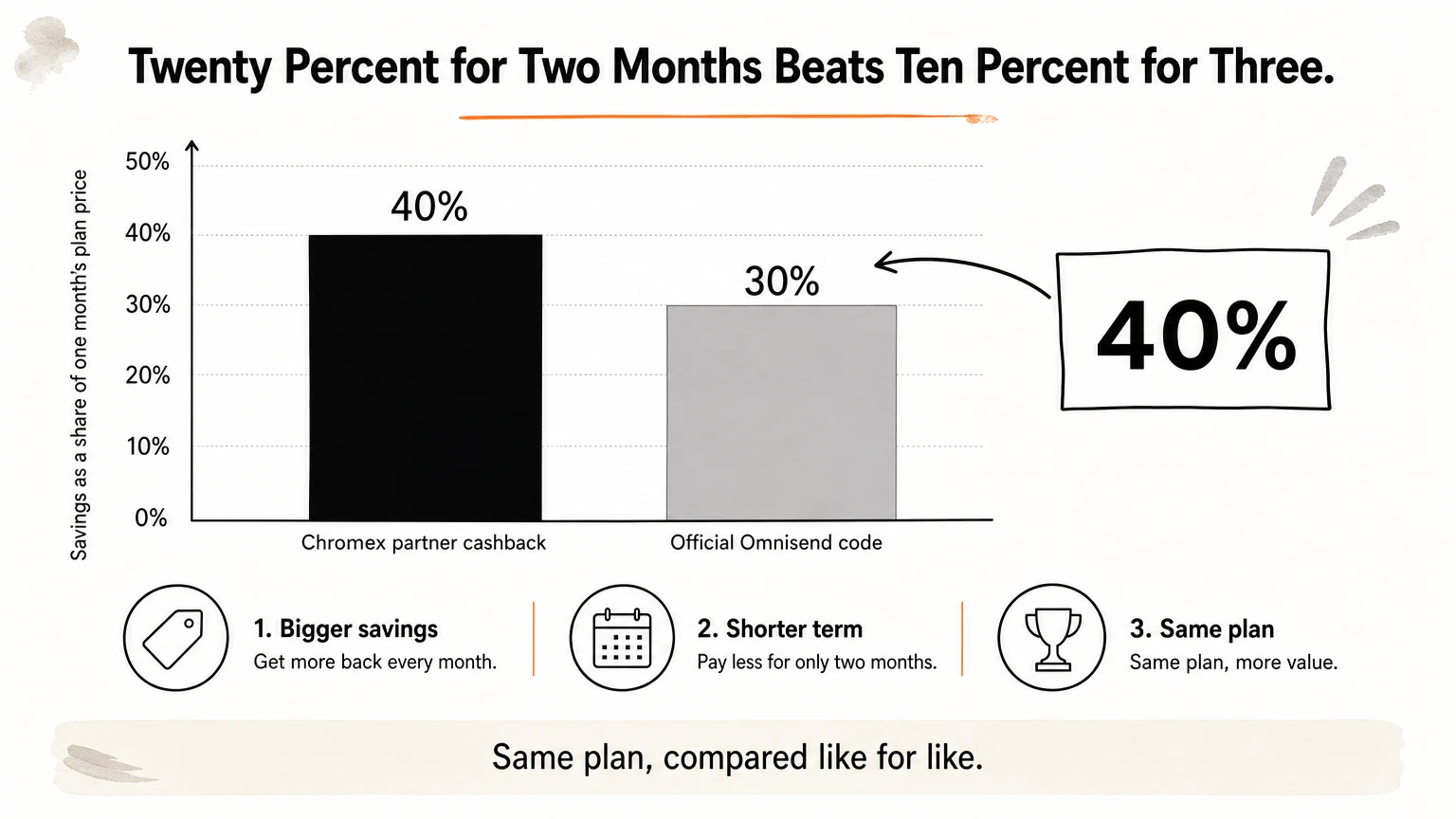
The Chromex partner link gives you 20% off your first 2 months of Omnisend, paid as cashback. It is the strongest offer on this list for a first-time buyer.
How it works
Chromex is an official Omnisend partner. When you sign up through the Chromex link, you get 20% off the first 2 months, returned as cashback instead of a checkout code. You buy your plan at the normal price, then the 20% comes back to you. Nothing to type in, and nothing that can expire at the cart.
The math explains the ranking. On the same plan, 20% for 2 months saves you the equivalent of 40% of one month's price. The official 10% for 3 months saves 30%. The partner link wins on total savings whenever you compare like for like.
Twenty percent for two months beats ten percent for three.
Who it suits
This route fits brands that are new to Omnisend, or moving over from another platform, and want a partner who knows the tool. Chromex builds flows, campaigns, and sign-up forms for Shopify-style stores, so you can also get help with setup instead of learning it alone.
What to know before you use it
Sign up through the partner link, not from the Omnisend homepage.
Cashback means you pay full price first, then receive the 20%.
The discount covers the first 2 months only. Budget for full price after that.
Ask whether it combines with the official 10% code before you assume both apply.
2. The official 10% Omnisend code
Omnisend's own offer is 10% off the Standard or Pro plan for 3 months. It is the safest Omnisend coupon code because it comes straight from the company.
How it works
Omnisend publishes one official code, and it is meant for people on the Free plan. New and existing Free plan users can apply it when they upgrade to Standard or Pro. You enter the code at checkout, and the 10% applies for the first 3 months of the paid plan.
Everything else you see online is a partner or affiliate arrangement. That does not make those offers bad, but it does mean they can change without notice, while the official code is the baseline.
The official code is the floor. Every other offer has to beat 10% for 3 months.
Who it suits
It suits brands that want to buy directly from Omnisend with no third party involved. It also suits teams already running on the Free plan, because their upgrade path and the discount line up. If you have no need for a partner, this is the simplest option.
What to know before you use it
It covers Standard and Pro. Enterprise is not included.
It runs for 3 months, then the plan renews at full price.
Apply it when you upgrade. Check the discounted total on the checkout screen before you confirm.
3. Coupon-site codes advertising 30% to 60%
Coupon sites list Omnisend promo codes with discounts of 30%, 50%, or even 60%, but these are the least reliable option. Some work, many are stale, and none beat the official terms by default.
How it works
Aggregator pages collect codes from affiliates, creators, and partner programs. Typical claims include 30% off Standard with a partner code, "up to 60%" for special groups such as military members, and rolling 50% promotions with a month in the page title. Date-stamped pages are often recycled, so a fresh date does not prove a fresh code.
A code that works for one partner's audience may be rejected for yours. Omnisend itself publishes a single official code, so anything larger depends on a program you may not qualify for.
A bigger number on a coupon page is a claim, not a price.
Who it suits
This route suits patient shoppers who will test two or three codes at checkout and accept that most will fail. If you value your time, skip it. The official code and the partner cashback are known quantities.
What to know before you use it
Use this table to see how the offers compare, then test any coupon-site code against it.
Offer | Advertised discount | Duration | Who qualifies |
|---|---|---|---|
Official Omnisend code | 10% | 3 months | New and existing Free plan users, on Standard or Pro |
Chromex partner link | 20% (cashback) | First 2 months | New signups through the link |
Coupon-site codes | 30% to 60% | Varies | Varies, often unclear |
If you try one, screenshot the cart total before and after. Never pay for a list of "unlocked" codes. If the discount disappears at the last step, close the tab and move on.
4. Start on the Free plan, then upgrade
Starting on the Free plan costs nothing and keeps the official discount available. It is the best way to save when your list is small and you are still testing.

How it works
Omnisend has a Free plan, and the official 10% code targets people on it. So the cheapest path is to build on Free first, then upgrade to Standard or Pro when you need more. Your sign-up forms, first automations, and campaigns can all be tested before you pay. Plan limits apply, so check the current plan page for what Free includes.
Because the discount runs for 3 months from the upgrade, timing matters. Those months are the ones you want to spend using paid features, not waiting on them.
Upgrade when you will use the paid features on day one, not before.
Who it suits
New stores with small lists benefit most. So do founders comparing Omnisend with Klaviyo who want a real trial instead of a demo. If you already have a large list and need paid features now, skip ahead to the partner link or the official code.
What to know before you use it
Set up your welcome flow and a sign-up form while you are still on Free.
Decide which paid feature you are upgrading for, then upgrade to get it.
Apply the official code during the upgrade, not afterward.
How to create unique discount codes in Omnisend emails
To create a discount code inside an Omnisend email, drag the Discount item into the email builder. On Shopify, BigCommerce, and WooCommerce, Omnisend then generates the code for you.
Add a Discount item to an email
Open the email editor and click Add Elements in the left sidebar.
Drag the Discount item into your email.
Choose Cart discount (percentage or fixed amount) or Free shipping.
Limit the offer to all products, a minimum order value, or specific collections.
Set an expiry period. The code expires at 11:59 PM in your account time zone on the day you set.
Optionally cap use per customer, set the button text and link, and turn on Gmail Annotations.
Campaign codes vs automation codes
In a campaign, Omnisend creates one code that every recipient shares. In an automation, each recipient gets a unique single-use code. Use shared codes for broadcast sales and unique codes for welcome series and abandoned cart flows, where you want to prevent code sharing.
Shared codes suit sales, unique codes suit flows.
Test emails always show a placeholder like XXXX-XXXX-XXXX. The real code is generated only when the email is sent, so that is normal.
SMS, reuse, and other platforms
Unique codes also work in SMS, but only inside automations. Add the Discount Code personalization tag to the message. To keep one offer consistent across several messages, enable Reuse unique discount code in this workflow. If the code would expire before the next message, Omnisend generates a fresh one.
If your store is not on Shopify, BigCommerce, or WooCommerce, create the code in your store admin and type it into the Discount item. For unique codes per customer, import them as a custom property and use a personalization tag. Redemption limits then live in your store, not in Omnisend.
Which Omnisend offer to pick
For most new buyers, the Chromex partner link is the best Omnisend discount code alternative: 20% back on the first 2 months beats the official 10% for 3. If you are already on the Free plan and want no third party, the official code is the clean choice. Coupon-site codes are worth a quick test, never a plan.
Once the plan is paid for, the real return comes from what you send. Unique codes in flows, sign-up forms, and tested campaigns are what turn a cheaper subscription into revenue. If you want an email marketing agency to build that for your store, book a call with Chromex and start with the partner offer.